Renewals: certificates, domains and licenses
The Renewals tab is one list of everything on site that runs out on a date: the certificate on every HTTPS address Collimo talks to, any others you list, your domains if you list them, and vCenter licenses. Soonest first. It's free in every edition.
Collimo only reads the dates. Renewing is done where each one was issued.
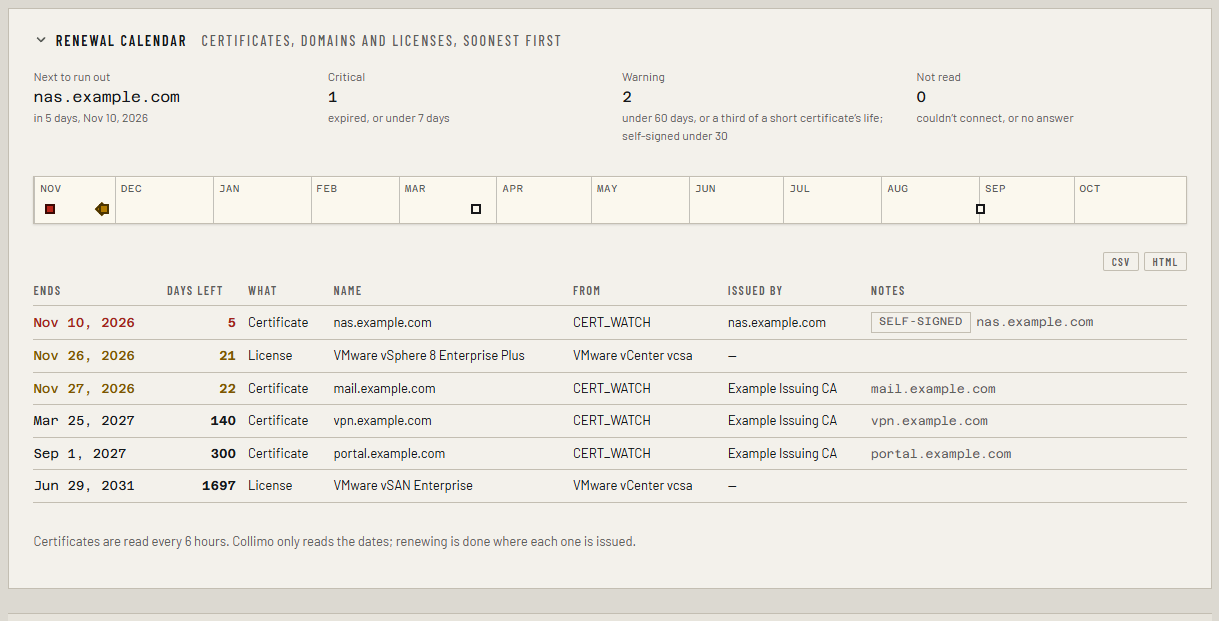
What is on it, with nothing to set up
The tab appears as soon as Collimo talks to anything over HTTPS:
- Every source whose address starts
https://: vCenter, Proxmox VE, Proxmox Backup Server, TrueNAS, Xen Orchestra, Veeam, HYCU, NetBox, phpIPAM, and each server's management controller (Redfish). A source with several addresses gets a row for each. - Every up-check of the
httpkind whose address startshttps://. - The UniFi console, and the Protect console when it is a separate box.
- The hub a site reports to, and on a hub its own
HUB_URL, when they arehttps://.
Add more certificates
- Open Settings → Stack environment.
-
Set
CERT_WATCHto the addresses, commas between. A port is only needed when it isn't 443:CERT_WATCH=mail.example.com, vpn.example.com:4443, 192.168.1.40:8443 -
Apply it:
- Open the
collimostack and find Environment variables. - Add or change the lines. In Advanced mode you can paste several at once.
- Click Pull and redeploy.
- Open
.envin the folder where you clonedcollimo-deploy. - Add or change the lines.
- Run
docker compose up -din that folder.
Add your domains
-
Set
DOMAINS_WATCHto the domain names, commas between:DOMAINS_WATCH=example.com, example.org -
Apply it, as above.
Domain lookups go out to the internet
Each domain is looked up once a day over RDAP, the registries' public
lookup service. That sends the domain name to the registry's RDAP
server, such as Verisign's for .com, from where Collimo runs. Nothing
else is sent. Leave DOMAINS_WATCH empty and nothing is looked up.
What the colors mean
| Row | Means | Alert |
|---|---|---|
| Red | Expired, or under 7 days left (under a sixth of its lifetime, if that's later) | critical |
| Amber, certificate | Under 60 days left, or under a third of its lifetime if that's later | warning |
| Amber, self-signed certificate | Under 30 days left, or under a third of its lifetime if that's later | warning |
| Amber, domain or license | Under 60 days left | warning |
| Plain | More time than that | none |
| couldn't connect | Nothing answered with TLS at that address | none |
The alerts are Certificate expiring or expired (cert_expiry),
Domain registration expiring or expired (domain_expiry) and, for
vCenter, Platform license expiring, expired or over-used
(platform_license). Each clears when the new date is read: certificates
every 6 hours, domains once a day, licenses hourly.
Why a short-lived certificate warns later
Let's Encrypt's certificates last 90 days, or 45, or about 6, and the software that renews them replaces each one when about a third of its life is left. So Collimo warns at that point, not at 60 days: a 90-day certificate turns amber at 30 days left, a 45-day one at 15, a 6-day one at about 2. If it's amber, the renewal should already have happened, and the alert says so. Look at the renewal job or service on that machine. Every public certificate gets shorter from March 2027, so this goes by the certificate's own dates, not by who issued it.
Why self-signed waits until 30 days
A self-signed certificate is one the device made for itself: a NAS, a switch, a management controller. Its owner renews it by hand when it gets close, so a warning two months out is mostly noise. One signed by a certificate authority, including your own company's or a Proxmox VE cluster's, warns from 60 days, since renewing it can need someone else.
Why \"couldn't connect\" is not an alert
If the address is down, its source or up-check already says so. The renewal calendar is only about dates, so it never raises a second alert for the same outage. It tries again after 15 minutes.
Already close when Collimo started
A certificate that is already within its warning when Collimo starts shows as a warning but isn't sent, like every alert already true at start. When it crosses into critical, that is news, and it is sent.
Columns
| Column | What it shows |
|---|---|
| Ends | The date it runs out |
| Days left | Whole days; N ago once it has run out |
| What | Certificate, domain or license |
| Name | The source, up-check or console's name, or the address; under it, the address Collimo read |
| From | Why it is watched: a source slot, an up-check, CERT_WATCH, DOMAINS_WATCH, the console, the hub |
| Issued by | Who signed the certificate |
| Notes | self-signed; the names the certificate covers; or why there is no date |
The strip above the list is the next twelve months, with a mark where each one ends: square for a certificate, round for a domain, diamond for a license.
What it doesn't do
- It doesn't say whether a certificate is trusted or matches its name. For that, run Tools → TLS on the address.
- IPv4 only, like the Tools tab.
192.168.100.1is never contacted, whatever list it is in: on some networks it's the cable modem, on others a Starlink dish.
In the metrics
| Metric | Labels |
|---|---|
infra_cert_expiry_timestamp_seconds |
target (host:port), source (its name) |
infra_domain_expiry_timestamp_seconds |
domain |
infra_platform_license_expiry_timestamp_seconds |
source, license, product |
Each is the end date in seconds since 1970, so (metric - time()) / 86400
is days left.