Backups
Ferrule's archive holds what the controller forgets: every outage, alert and event, the audit log, your users, your license and your inventories. Backups keep it safe, and let you rebuild the stack anywhere and have it come back as it was.
| Where to | Edition |
|---|---|
| An NFS or SMB share | Free, in every edition |
| S3-compatible storage: Wasabi, Backblaze B2, Cloudflare R2, MinIO or AWS | Paid, and free during the 30-day trial |
| Restoring, from either | Free, always |
You can use a share, S3, or both.
What's backed up, and when
| What | When | Kept per target |
|---|---|---|
| The archive | daily at 03:30 (BACKUP_AT) |
14 (BACKUP_KEEP) |
| The history behind the graphs | weekly, on Sunday (BACKUP_HISTORY_DAY) |
4 (BACKUP_HISTORY_KEEP) |
Times are in your time zone, TZ. BACKUP_HISTORY=false leaves the history
out. A backup missed while the stack was down is taken a couple of minutes
after it starts again.
Set an encryption key first
BACKUP_KEY=<32 random bytes in base64>
Click Make a key on Settings → Backups (or in Settings → Stack
environment), or run openssl rand -base64 32. Backups are then encrypted
with AES-256-GCM. Without a key they're not encrypted, so set one, and
always for S3: those backups leave your network.
Keep a copy of BACKUP_KEY
Store it outside the stack, such as in your password manager. Without it nothing can be restored, and a new key can't read backups made under the old one.
To a share (free)
Docker mounts the share for you as a volume, described by an extra compose file, so nothing goes on the host's own folders.
- Make sure the Docker host has the client:
nfs-commonfor NFS, orcifs-utilsfor SMB, on Debian and Ubuntu. -
Add the extra compose file:
Open the stack's Git settings and add
docker-compose.backup-nfs.ymlordocker-compose.backup-smb.ymlunder Additional paths, besidedocker-compose.yml.Name both files every time you run Compose:
docker compose -f docker-compose.yml -f docker-compose.backup-nfs.yml up -d -
Add the share's settings:
BACKUP_NFS_SERVER=192.168.1.20
BACKUP_NFS_PATH=/volume1/backups
Ferrule writes as user and group ID
65534, and the export must allow that. On a Synology, set the NFS rule's squash to Map all users to admin. Elsewhere, useall_squash,anonuid=65534,anongid=65534, or make the folder owned by 65534.BACKUP_SMB_SERVER=nas.lan BACKUP_SMB_SHARE=backups BACKUP_SMB_USERNAME=ferrule BACKUP_SMB_PASSWORD=<its password>The account must be able to write to the share. The password can't contain a comma.
-
Redeploy.
Backups land in a folder named after BACKUP_NAME (ferrule unless you
change it) on the share.
Changing the share's settings later
Docker reads them only when it first creates the volume. To change them,
such as a new SMB password: stop the stack, remove its backup-target
volume (under Volumes in Portainer; your backups are on the share,
not in the volume), and redeploy.
To S3 (paid)
Make the bucket first, and a key that can list, read, write and delete in that bucket only. No extra compose file is needed:
BACKUP_S3_ENDPOINT=s3.us-east-1.wasabisys.com
BACKUP_S3_REGION=us-east-1
BACKUP_S3_BUCKET=my-ferrule-backups
BACKUP_S3_ACCESS_KEY=<the key>
BACKUP_S3_SECRET_KEY=<its secret>
The region must match the bucket's. Backups land under
ferrule/<BACKUP_NAME>/ in the bucket (BACKUP_S3_PREFIX changes
ferrule). If the trial or license ends, S3 backups pause and the share
carries on. Restoring from S3 always works.
Check it on Settings → Backups
The panel shows the schedule, what's kept, whether encryption is on, and each target with its last archive and history backup. Back up now takes an archive backup straight away; Back up now, with history adds the history. With sign-in on, both need the operator role.
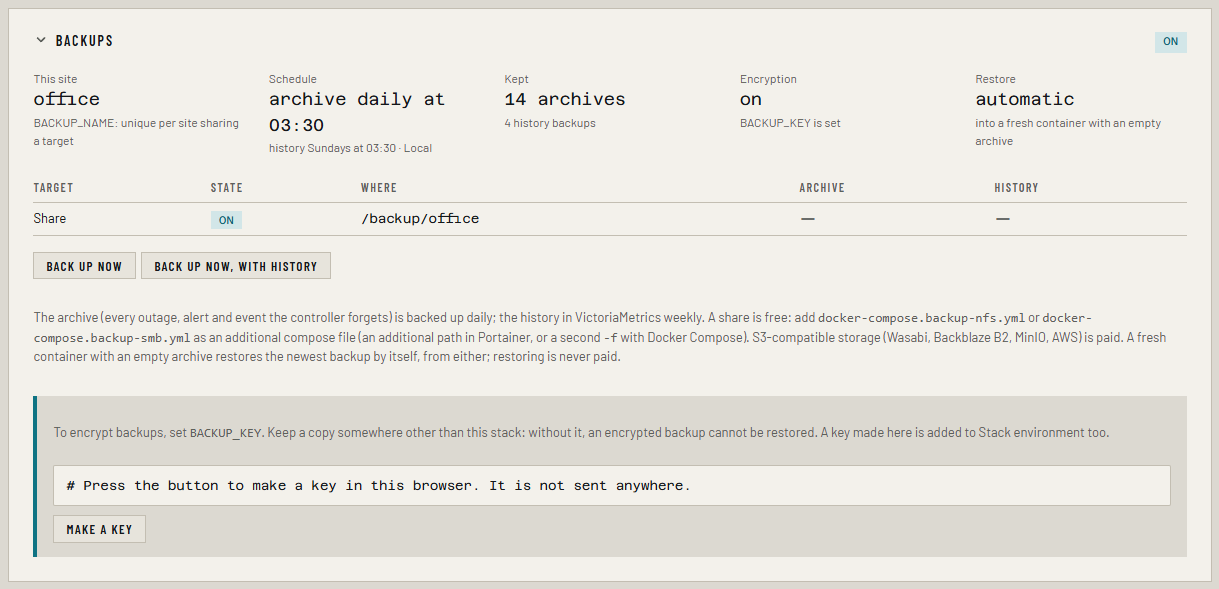
A failed backup raises a Backup failed warning, which notifies like any other alert.
Restoring
A new stack with an empty archive restores the newest backup by itself, before it starts, from whichever target has the newest. History is loaded back into an empty VictoriaMetrics the same way.
To rebuild on a new Docker host, or after losing the old one:
- Deploy the stack with the same
BACKUP_NAME,BACKUP_KEY,SETTINGS_KEYand backup target settings as before. - Start it. Settings → Backups says "Restored the archive from the … backup taken …".
To roll back an existing stack instead, stop it, remove its ledger-data
volume (and vm-data too, for the history), and redeploy. Portainer shows
them with the stack's name in front, such as ferrule_ledger-data. Anything recorded
since that backup is lost.
BACKUP_RESTORE=off stops Ferrule from ever restoring by itself.
Sites sharing a target
Give each site its own BACKUP_NAME, and keep the name when you rebuild
a site, or it won't find its backups.
If something's wrong
| What you see | What to do |
|---|---|
permission denied writing to an NFS share |
The export doesn't let ID 65534 write. See the NFS step above |
set BACKUP_NFS_SERVER to the NAS when deploying |
The extra compose file is there but its settings aren't |
| "Paid target: needs a license or the trial" | S3 is paused. Restoring from it still works |
| "Could not restore the archive…" | Usually a different BACKUP_KEY from the one the backup was made with |
More in Troubleshooting.