Rack cooling
A rack gets hotter one server at a time. The day it is too hot shows up as fans at full speed, a server throttling, or a drive failing early, and by then the room has been past its limit for weeks. Rack cooling reads the air going into each server, from its management controller (BMC), groups the servers by rack, and warns when a rack runs hot:
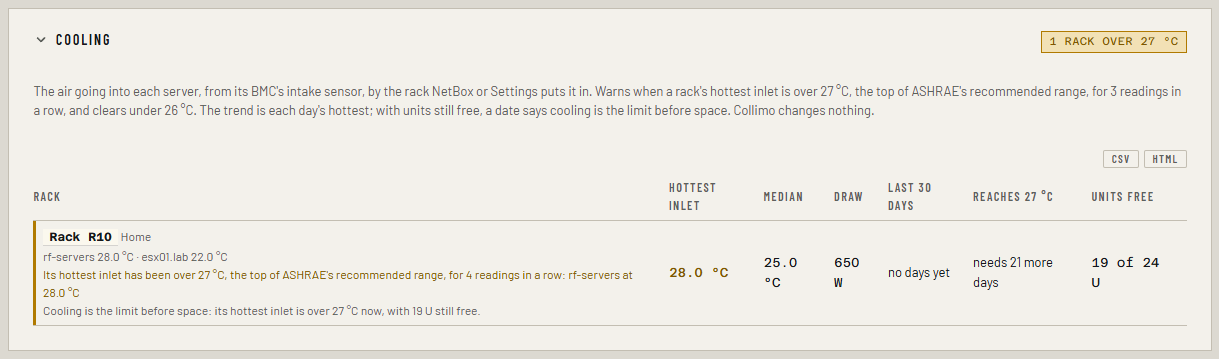
Rack R10, Home is running hot: its hottest inlet has been over 27 °C, the top of ASHRAE's recommended range, for 3 readings in a row: rf-servers at 28.0 °C.
It also keeps each rack's hottest inlet for every day, and says when the trend reaches 27 °C. When that comes while the rack still has free units, the Capacity tab says cooling is the limit before space: the next server needs more cooling, not just a free slot.
This is a warning, never critical: a server's own critical temperature is what pages. Rack cooling is part of Business and MSP. Collimo only reads: it never changes a fan, a server or the room.
Before you start
- Your servers' BMCs over Redfish. iDRAC, iLO, XClarity and others: see Servers over Redfish. Most BMCs report an inlet (or "ambient") temperature with no extra setup.
-
Which rack each server is in. Either:
- NetBox (see NetBox): mount each server in its rack, with its serial number or its host name, and Collimo finds it; or
- Settings → Capacity planning → Racks: add the rack and list the server's host name under what it holds.
A server in no rack is listed under Not in a rack, and never warns as a rack. 3. Free units, for "cooling before space". From NetBox (the rack's height and what is mounted in it), or the free units you set on Settings. Without them the date is still shown. 4. Three weeks, for the trend. Each day's figure is kept when the day ends; a trend needs 21 days. Readings are kept on every edition, so a license added later starts with the history there. The archive kept between restarts (
LEDGER_PATH, on by default) holds it.
Read it
On the LAN tab, each rack's heading shows its hottest server inlet, in °C. It is amber while that rack's warning is new.
On the Capacity tab, the Cooling section lists every rack, hottest first:
- the rack, and each server in it with its inlet;
- the hottest inlet and the median across the rack;
- the servers' total draw, when every one of them reports it;
- the last 30 days: each day's hottest inlet as a bar, under a dashed line at 27 °C;
- reaches 27 °C: when the trend gets there, if it is rising;
- units free, and whether cooling is the limit before space.
A row is amber while its warning is new, until you mark it seen in Needs attention.
Why 27 °C
ASHRAE's recommended range for the air going into servers is 18 to 27 °C. Servers run above it, but fans spin harder, power draw rises and parts age faster. Your servers' own warning and critical thresholds are higher, and still warn on their own.
Which sensor is the inlet
A Redfish temperature sensor whose PhysicalContext is Intake. A BMC
that gives no sensor a context is read by name: inlet, intake or
ambient, never a power supply's ("P/S 1 Inlet"), a processor's or an
exhaust. When a server has several, the hottest counts. BMCs that offer
only the newer ThermalSubsystem aren't read yet; their panel says so.
When it warns
- Look at the front of the rack. Missing blanking panels, a door left open at the back, cables or boxes in front of the intakes, a server mounted backwards: hot exhaust air finds its way back in.
- Check the room's cooling: its set point, and whether a unit has failed or is short of airflow.
- Spread the load: move a hot server to a cooler rack before adding another one here.
The warning clears by itself once the hottest inlet is under 26 °C. If a server's own BMC already warns on that same sensor, the rack doesn't warn again.
Adding a host
On the Capacity tab, What if → Add a host checks the rack, not just the cluster (see Adding a host: the rack check). With rack cooling, it adds a line: the rack's inlet estimated after one more host like the existing one. The estimate comes from how this rack's inlet has followed its servers' draw, once there are 14 days of both; until then it says not enough history. It is rounded to a whole degree, and it is an estimate, not a measurement.
How the figures are worked out
- Every reading of the servers' BMCs gives each rack its hottest and median inlet. A reading counts once toward the "3 in a row", however often the dashboard polls.
- Once a minute the rack's hottest inlet, and its servers' total draw, are kept for the day. At midnight the day's hottest, the median of the readings and the median draw are kept, if there were at least 10 readings. Days are kept beside the archive for two years.
- The trend is the one capacity planning uses (see How forecasts work), over the last 90 days of each day's hottest.
- Free units are what NetBox or Settings say today: Collimo keeps no history of units, so "before space" means before today's free units are used.
- The add-host estimate is the median slope between days at least 20 W apart in draw, in °C per kW, times the new host's average draw.
Alerts and metrics
| Alert | When | Level |
|---|---|---|
Rack inlet over 27 °C (rack_inlet_hot) |
a rack's hottest server inlet over 27 °C on 3 readings in a row; clears under 26 °C | warning |
infra_rack_inlet_celsius{rack, site, stat} is each rack's server inlet
now: stat="max" the hottest, stat="median" the median. Servers in no
rack have none.