Wi-Fi
If your UniFi network has access points, the LAN tab shows where each radio sits in the spectrum, which APs share airtime, and how busy each radio is. Ferrule warns when a radio stays busy or keeps retrying, and records every channel change, including the ones an AP makes by itself after hearing radar.
The channel map
Wi-Fi channels sits at the top of the LAN tab, with a section for each band in use: 2.4 GHz, 5 GHz and 6 GHz. Click a band's heading to open or close it.
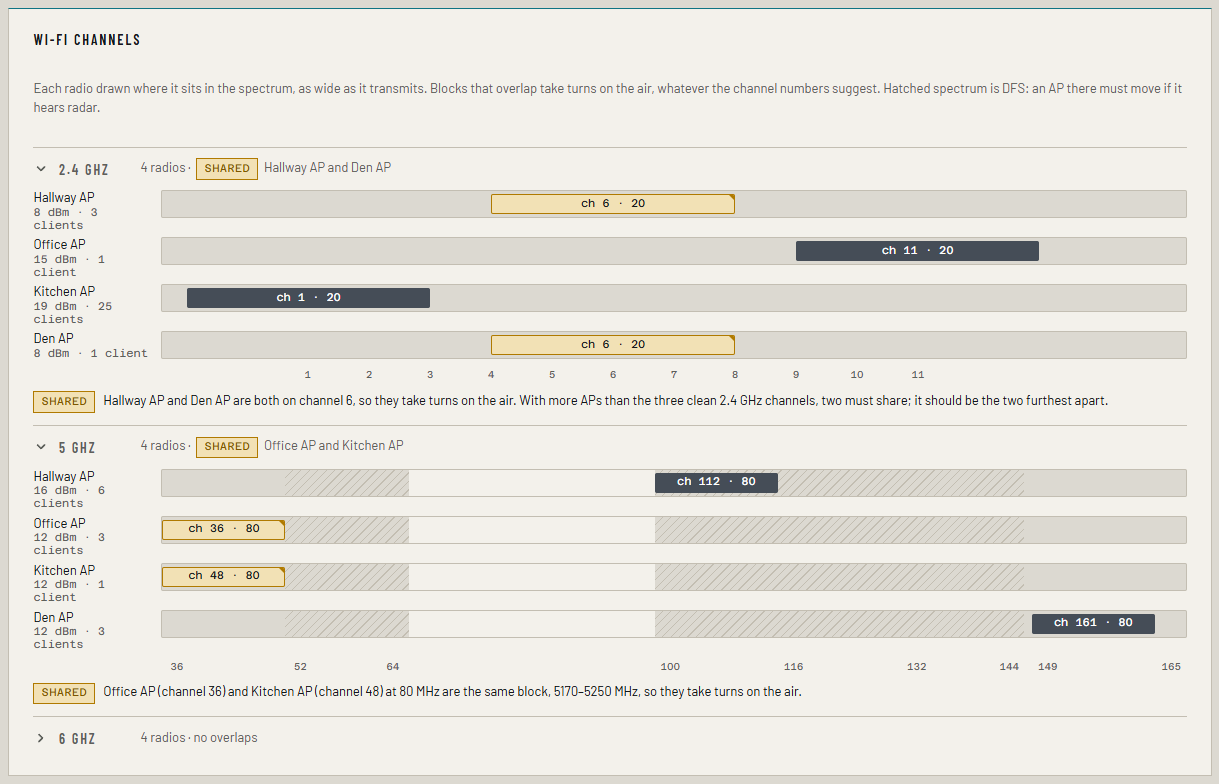
- Each radio is a block as wide as the channel it transmits on, labelled
with its channel and width, such as
ch 36 · 80. Beside it: the AP's name, transmit power and client count. - Hatched spectrum is DFS: channels 52 to 144 on 5 GHz. An AP there must move if it hears radar.
- Where two blocks overlap, the band's heading shows a shared pill and a note under the map says which APs share and why.
Shared channels are a planning fact, not an alert
Two APs whose blocks overlap take turns on the air, whatever the channel numbers say. At 80 MHz, channels 36 and 48 are the same block. On 2.4 GHz, with more than three APs, two must share; ideally the two furthest apart.
Ferrule shows sharing so you can plan, but never alerts on it. What it alerts on is the effect: a radio that is too busy or retrying too much.
An access point's row
Closed, an AP's row shows a tile per band: the channel, a small busy bar and the busy figure. A tile is amber when that radio shares its block.
Open, it has a table per radio: channel (tagged DFS or with the APs it shares with), width, power, clients, how busy the air is, retries and the average client signal. The busy bar splits into this AP sending (aqua), receiving (pale aqua) and everyone else on the channel (amber). Notes under the table explain anything unusual, such as a retry figure from too few packets to judge.
Busy and retry alerts
| Alert | Raised when, for three readings in a row |
|---|---|
| Wi-Fi airtime busy | The channel is busy more than 70% of the time |
| Wi-Fi retries high | 15% or more of packets are retried, over at least 1,000 packets |
Both are warnings, and each clears after three readings in a row back under the line, so a radio near it doesn't raise and clear every few minutes.
"Readings", not polls: the controller doesn't refresh every AP on every poll, so Ferrule counts only readings that changed. Three readings can take longer than three polls.
With a license or the trial, you can move the retry threshold, or turn it off, for one AP or radio: see Alert thresholds.
Channel changes and DFS moves
Every channel change is kept in the archive and drawn on the WAN tab's timeline as a channel change marker in that AP's lane. Click it for the detail.
When an AP leaves a DFS channel, the detail adds: It left a DFS channel on its own, which usually means it heard radar; its clients dropped and reconnected. That is the answer to "why did everyone's Wi-Fi drop at 3:12".
The first channel Ferrule sees on a radio is its starting point, not a change. A change that happened while Ferrule was stopped is noticed on its first poll, and says found when the collector started, because its time is when it was noticed.
If something's wrong
| What you see | Why, and the fix |
|---|---|
| No Wi-Fi channels map | No access point in this Network console reports its radios |
| A radio's retries show muted | Too little traffic, under 1,000 packets, to judge |
| A busy radio has no alert yet | It needs three changed readings in a row over the line |
More in Troubleshooting.