Cameras and the NVR
The Cameras tab shows your UniFi Protect recorder (the NVR, such as a UNVR) and every camera on it. It tells you what the Protect app makes hard to see at a glance: whether a recording disk is failing, and how hot the recorder runs.
The tab appears once Protect is connected: see UniFi Protect.
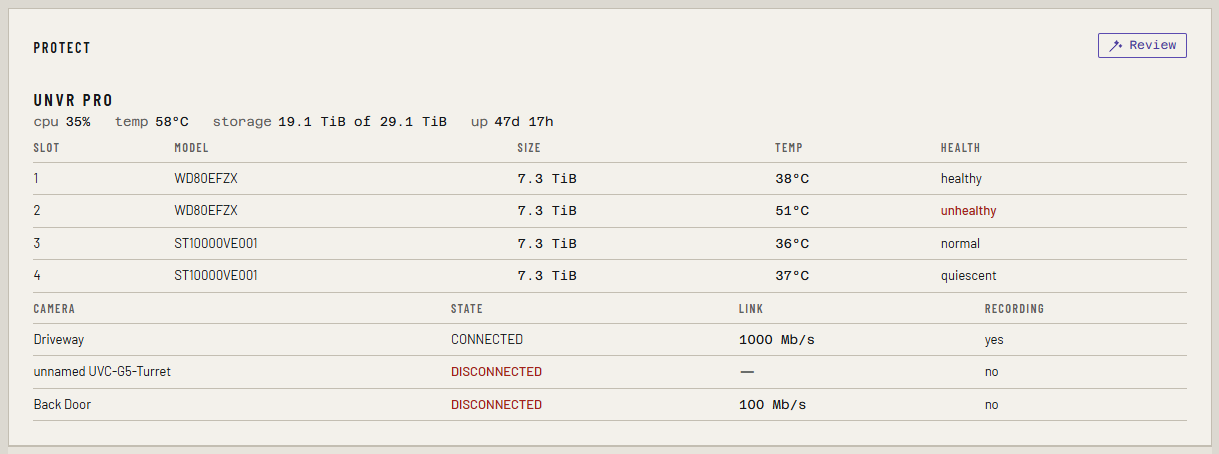
The NVR
The recorder's name heads the panel, with its vitals:
| Reading | Means |
|---|---|
| cpu | Processor load |
| temp | Processor temperature. Turns amber at 75 °C |
| storage | Recording space used, of the total. Turns amber above 95% |
| up | Time since the recorder last restarted |
Below it is a row for each disk: Slot, Model, Size, Temp and Health. A disk the recorder reports as failing reads unhealthy in red, and raises the critical NVR disk unhealthy alert, the one alert on this tab.
The cameras
One row per camera:
| Column | Means |
|---|---|
| Camera | Its name in Protect. An unnamed camera shows as unnamed and its model |
| State | As Protect reports it. Anything but connected is in red |
| Link | The camera's network link speed |
| Recording | Whether it is recording now |
A camera that isn't connected shows in red here, but it doesn't raise an alert or a notification.
Disk health and temperatures need the local admin
Protect gives two ways in. The API key alone lists the cameras. Disk health, disk and NVR temperatures, and each camera's traffic need Ferrule to sign in with a local admin account on the recorder, with MFA off.
Without that account, the tab shows the cameras and a note:
Disk health, NVR temperatures and camera throughput need bootstrap access. Set PROTECT_USERNAME and PROTECT_PASSWORD to a local-only account with MFA disabled.
If Protect runs on the same console as Network, the note names
UNIFI_USERNAME and UNIFI_PASSWORD instead.
A separate UNVR needs its own account
A UNVR is its own console. The admin and API key you made on the gateway don't work on it. Make both again on the UNVR, as in UniFi Protect.
If an account is set but the sign-in failed, a red line under the note says Bootstrap was tried and failed: and the reason, such as a rejected password.
Camera traffic isn't drawn on this tab. It is in the history as
infra_camera_receive_bytes_total and infra_camera_transmit_bytes_total:
see History and graphs.
If something's wrong
| What you see | Why, and the fix |
|---|---|
| No Cameras tab | Protect isn't connected, or PROTECT_ENABLED=false is set |
| No disks, and the note about bootstrap access | No local admin is set for the recorder. Add PROTECT_USERNAME and PROTECT_PASSWORD |
| Bootstrap was tried and failed | The account was rejected. Check it is a local account, made on the recorder itself, with MFA off |
| The red line says bootstrap is disabled | PROTECT_BOOTSTRAP=false is set. Remove it |
More in Troubleshooting.