QNAP
This page gets Ferrule reading your QNAP NAS over SNMPv3.
What Ferrule reads: model, firmware, uptime, CPU, memory, temperatures and fans; every disk's (and M.2 drive's) status and temperature; every storage pool's status and use. What it can't: it changes nothing. QNAP has no read-only account for its API, so Ferrule uses SNMPv3, the version of SNMP with a password and encryption.
Turn on SNMPv3
On the QNAP, go to Control Panel → Network & File Services → SNMP:
- Tick Enable SNMP service, and choose SNMPv3 only.
- User name
telemetry. - Authentication HMAC-SHA, with a passphrase of at least 8
characters and no colon (
:). - Turn on privacy (encryption): CBC-DES, with a different passphrase of at least 8 characters.
- Click Apply.
No colon in the authentication passphrase
Ferrule keeps both passphrases in one value, joined by a colon. A colon inside the first one would split it in the wrong place.
Is DES safe enough?
It's the only cipher QNAP offers. It's weak against a determined attacker, but far better than older SNMP, which sends everything in plain text. Keep SNMP on your management network.
Enter it in the setup wizard
On the wizard's What you have page, set QNAP to the number you have. On its page:
- Name: what you call it, such as
ts453. - Address: the QNAP's name or IP address, without
https://:192.168.1.40. - SNMPv3 user:
telemetry. - Authentication passphrase and Privacy passphrase: from steps 3 and 4.
- Click Test.
When it works you see ✓ Connected: and what it found, such as
2 volumes, 4 disks, all healthy.
The wizard won't let you download your settings while a passphrase is shorter than 8 characters or the authentication passphrase has a colon.
Editing the stack by hand
The secret is both passphrases with a colon between them. Write any $
as $$.
SOURCE_5=qnap 192.168.1.40 name=ts453 user=telemetry
SOURCE_5_SECRET=<authentication passphrase>:<privacy passphrase>
If you chose HMAC-MD5 on the QNAP, add auth=md5 to the end of the
SOURCE_n line; the wizard has no field for it. See
Every variable.
Where it shows up
The NAS gets a panel on the Storage tab. Settings → Sources lists it as polling; for the first minute it says waiting for first poll.
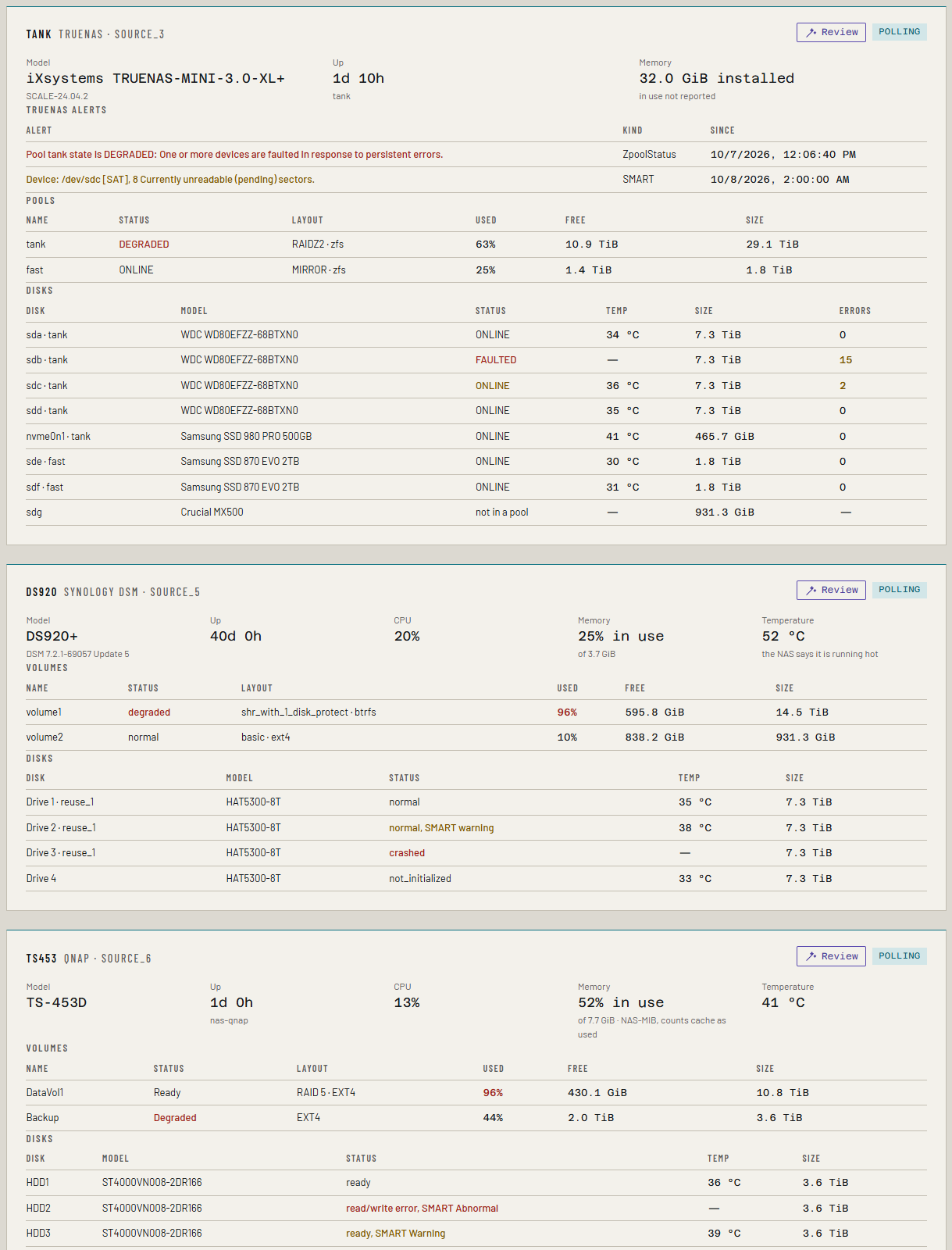
It alerts on a pool or disk QNAP reports as failing or degraded, and a volume nearly full (90% is a warning, 95% is critical).
Pool layout, for adding disks
New in the next release
This is on the dev and qa builds now, and in the next release.
Ferrule reads each volume's RAID level where the NAS reports it
(DataVol1, RAID 5), and on QTS's older table, how many drive bays are
empty.
The add disks what-if then works out what more disks give: RAID 5 and 6 count every disk at the smallest's size, RAID 10 grows a pair at a time, and RAID 1 gains nothing. It says how many bays are free, and when the disks need more than that, an expansion unit or bigger disks.
If something's wrong
The Docker host must reach the QNAP on UDP port 161. Firewalls often allow TCP and block UDP.
| What you see | What to do |
|---|---|
| no answer from ...; is SNMPv3 on, and UDP 161 reachable? | Check step 1, and that UDP 161 is open from the Docker host. |
| QNAP refused SNMPv3: the agent does not know user "telemetry" | Check the user name in step 2. |
| ... wrong authentication passphrase, or the agent does not use SHA | Check the passphrase, or add auth=md5 if you chose MD5. |
| ... wrong privacy passphrase, or the agent does not use DES | Check the privacy passphrase. |
| the authentication passphrase arrived as N characters; SNMPv3 passphrases are at least 8 | Usually a $ in the stack that wasn't written $$. |
| QNAP: the agent answered but has neither QNAP MIB; is this a QNAP? | The address points at another device. |
See Troubleshooting for more.