Placement advice: evening out a cluster without DRS
Proxmox VE has no DRS, and a vCenter cluster may have it turned off. Over months, VMs pile up on one host while another sits half empty, until the full one runs short of memory. Placement advice looks at each such cluster and, when it's worth it, says which VMs to move and where:
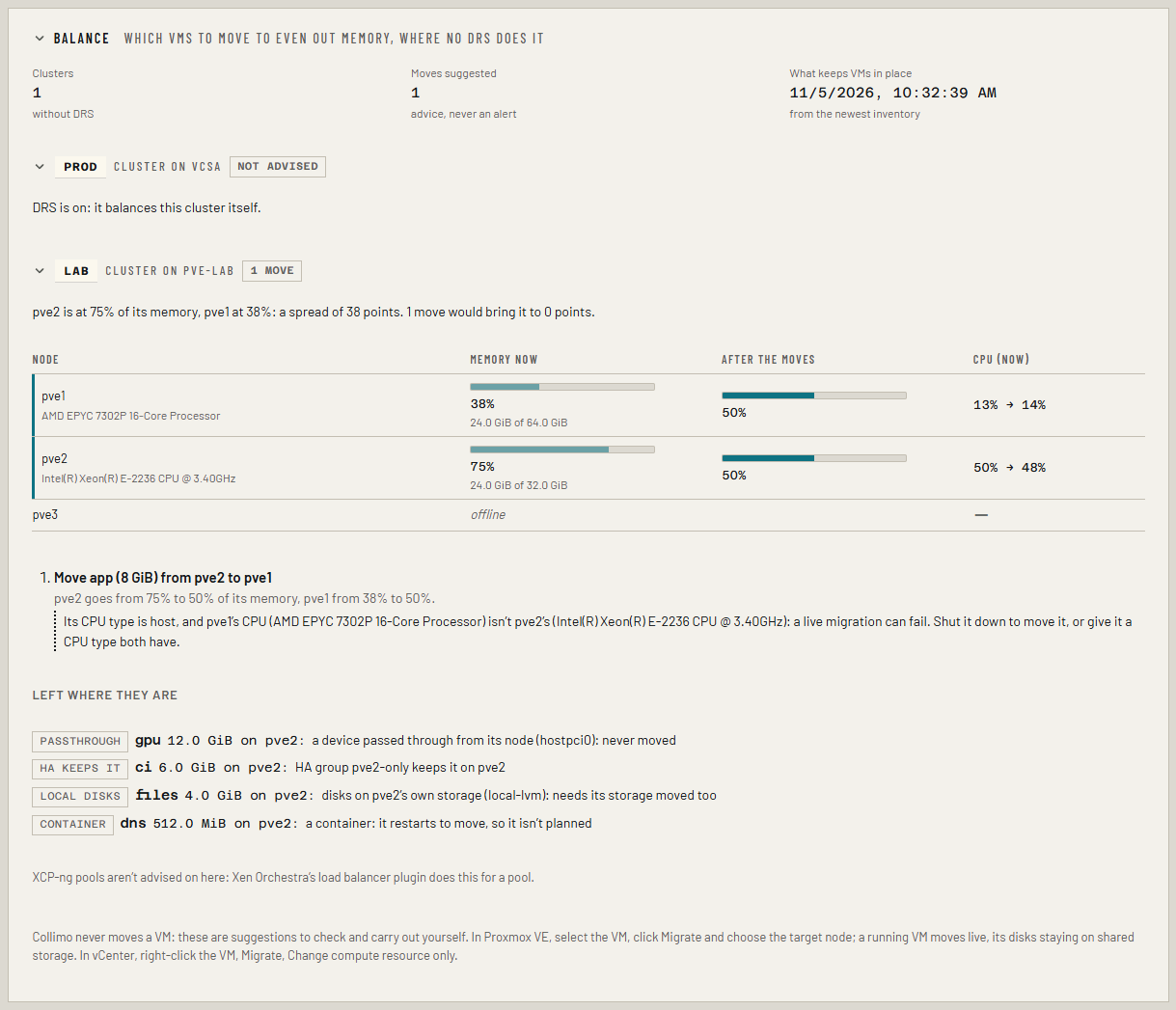
Move app (8 GiB) from pve2 to pve1. pve2 goes from 75% to 50% of its memory, pve1 from 38% to 50%.
It is advice only. Collimo never moves a VM, and there is no button that does: you check the suggestion and carry it out yourself. It never raises an alert either. Placement advice is part of Business and MSP.
Before you start
- Your hypervisors: a Proxmox VE cluster, or vCenter (see Proxmox VE and vCenter). The read-only account you already gave Collimo is enough.
- An inventory. What keeps each VM where it is (its disks, devices passed through, HA groups and rules) comes from the newest inventory, which runs daily by itself on Business. To get one now, open the Virtualization tab and choose Take inventory now. Until there is one, nothing is planned.
Read the panel
Open the Virtualization tab and scroll to Balance.
- Each cluster has its name on a label and one of:
- balanced: memory is within 20 points across the nodes, and none is past 85%. Nothing to do.
- n moves: it's worth evening out, and here is how.
- nothing can move: it's worth evening out, but every VM on the fullest node is held where it is (the list says why), or every node is past 85% and the cluster needs more memory, not moves.
- not advised: DRS is on and balances the cluster itself, or Collimo can't tell yet.
- The sentence under the label says why, in numbers.
- The table has one row per node: its memory now, and after the moves as a second meter. A node the moves change has a rule at its left. CPU is shown too, as a 7-day average where capacity planning has a week of history, otherwise as it is now.
- The moves, in order, each as a sentence, with what it does to the two nodes and anything to check first.
- Left where they are: the running VMs on the fullest nodes that the plan won't touch, and why.
Carry out a move
Proxmox VE: select the VM, click Migrate, choose the target node, and click Migrate. A running VM moves live; its disks stay where they are on shared storage. A VM managed by HA is migrated by HA when you do this.
vCenter: right-click the VM, Migrate, Change compute resource only, and pick the host.
The panel updates on the next poll after the move. Do one move at a time and read the panel again: the next suggestion may change.
Check before you move
A suggestion is worked out from what Collimo reads. It doesn't know about a VM you pinned to a host by habit, a license tied to a host, or a maintenance plan. Read each caveat, and if a move doesn't make sense for your site, don't make it.
Why a VM is left where it is
| Label | Why |
|---|---|
| passthrough | It has a device passed through from its host (a GPU, a USB stick, a PCI card). It can't run anywhere else, so it's never moved. |
| local disks | Some of its disks are on the host's own storage (such as local-lvm). Moving it means moving those disks too, which is slow and needs space on the other host, so it isn't planned. |
| HA keeps it | A Proxmox VE HA group or rule keeps it on its current node. Where a group prefers some nodes over others and fails back, only the preferred ones count: HA would move it back. |
| kept together | An HA rule keeps it on the same node as other VMs, so it can't move alone. |
| container | A container restarts to move, so it isn't planned. |
| not inventoried | It started after the newest inventory, so its disks and devices aren't known. It is planned after the next one. |
A VM whose CPU type is host, moving between nodes with different
processors, is planned but flagged: a live migration can fail. Shut it
down to move it, or give it a CPU type both nodes have (such as
x86-64-v2-AES).
How the plan is made
- Memory first, because it's what runs out. A node's memory is what it uses now; on Proxmox VE the ZFS ARC is left out, as ZFS hands it back under pressure. A VM counts with the memory it is configured with, not what it uses: its use counts the guest's cache, and a VM can grow to its full size on the new host.
- Worth it when the fullest node is more than 20 points of memory above the emptiest, or a node is past 85%.
- Then, up to five moves: each time, of the VMs on the fullest node, the one whose move leaves the smallest spread, to the emptiest node that can take it without going past 85% of its memory or of its CPU. It stops once the spread is under 10 points.
- CPU second: it breaks ties, and keeps a move from loading a node's CPU past 85%.
- Only running VMs; never a template.
- HA: from Proxmox VE's HA groups (version 8) and HA rules (version 9), read with the same read-only account. A VM kept apart from another by a rule is never planned onto that VM's node.
vCenter
Only a cluster whose DRS is off is advised on; the inventory says which. A host in maintenance mode takes nothing. A VM with a PCI device passed through (DirectPath I/O or a vGPU) is never moved; one with a disk on a datastore only its host sees is left out. vCenter's VM/Host rules aren't read, so check the cluster's Configure → VM/Host Rules before moving a VM.
XCP-ng and Nutanix
XCP-ng pools aren't advised on: Xen Orchestra's load balancer plugin does this for a pool. Nutanix isn't a source yet.
Metric
infra_cluster_memory_spread_ratio{source, cluster} is the fullest node's
share of memory in use less the emptiest's, for each cluster advised on
(not for one DRS balances). Graph it to see a cluster drift apart over
months.