The assistant
The assistant sends what Ferrule knows about one alert, device or system to a language model you choose, and shows you what it makes of it: what's wrong, why, and what to check. It advises and changes nothing. This is a paid feature, and free during the 30-day trial.
Ask it
- Explain sits on each alert in Needs attention.
- Review sits inside each device row on the LAN tab once you open it, on the WAN and Protect panels, and on each server and storage panel.
The buttons only appear once a model is set up (see Add a model below), and, with sign-in on, only to operators and admins.
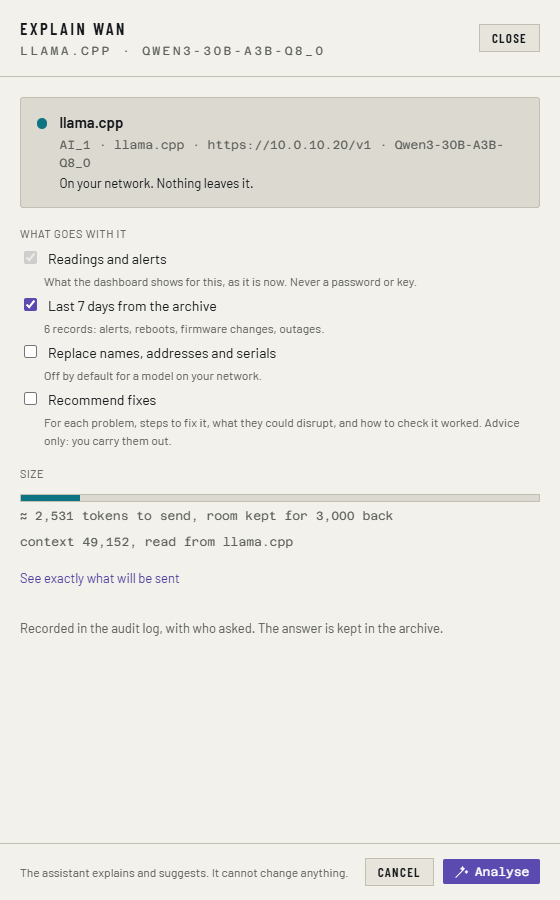
Either opens a panel that shows, before anything is sent:
- which model will answer, and whether it's on your network or outside your network;
- What goes with it: the readings and alerts (never a password or key), and if ticked, the Last 7 days from the archive;
- Replace names, addresses and serials, see below;
- Recommend fixes: steps for each problem, what they could disrupt, and how to check they worked. Advice only: you carry them out;
- the size of the question against the model's limit and, for Claude, its cost;
- See exactly what will be sent.
Click Analyse. The answer comes back as cards: how serious, what's wrong, steps, and the readings behind each one.
Every question goes in the audit log with who asked and which model, and every answer is kept in the archive.
Names, addresses and serials
With Replace names, addresses and serials ticked, Ferrule swaps the
names of your sources, hosts, VMs, devices, cameras and NVR, their serials,
and IP and MAC addresses for stand-ins such as SOURCE-1 or IP-2 before
anything leaves. It puts the real ones back in the answer. Disk and volume
names stay as they are.
It's on by default for a model outside your network, and off for one on your network.
Who may ask
| Model | Who |
|---|---|
| On your network | operators and admins |
| Outside your network | admins only. Operators see it in the list, marked so |
A model is on your network when its address is private or loopback, or a
host name with no public suffix, such as one ending .lan, .local or
.home. Anything else is outside, and there's no setting to say otherwise.
With sign-in off there are no roles, and anyone who can open the page can
ask.
Add a model
You can have up to four, in AI_1 to AI_4. Whoever asks picks one.
- Open Settings → Assistant and find Add a model.
- Pick the Provider, and fill in what it asks for.
- Add the lines it writes to your stack's settings. A hosted model's key
goes in the slot's own key line, such as
AI_2_KEY: replace the placeholder there. - Redeploy.
AI_1=llamacpp http://llm-box.lan:8080/v1 name=GPU-box
| Provider | Address | Notes |
|---|---|---|
llamacpp |
http://<host>:8080/v1 |
Start llama-server with --host 0.0.0.0 and --jinja, and -np 1 if it's only for this. Ferrule reads the model and context from it |
lmstudio |
http://<host>:1234/v1 |
In the Developer tab, start the server and turn on Serve on local network. Load the model with 16K of context or more, and set context= to match |
ollama |
http://<host>:11434/v1 |
Set OLLAMA_HOST=0.0.0.0 where Ollama runs. Give model= as ollama list shows it |
local |
the server's /v1 address |
Any other OpenAI-compatible server, such as vLLM. Give model= |
The first question to a desktop machine usually takes 20 to 60 seconds.
AI_2=claude name=Claude
AI_2_KEY=<from console.anthropic.com>
| Provider | Key from | Model |
|---|---|---|
claude |
console.anthropic.com | claude-opus-5-5 unless you set model= |
openai |
platform.openai.com | required: model= as OpenAI lists it |
gemini |
Google AI Studio | required: model= as AI Studio lists it |
xai |
console.x.ai | required: model= as xAI lists it |
Each provider bills you for what you ask. Set a spending limit on the key's account.
Settings → Assistant lists every model and whether it answered when last checked: answering, not answering or key refused. Each model takes one question at a time. A question only ever goes to the model its preview named: there's no automatic switch to another.
If something's wrong
| What you see | What to do |
|---|---|
| "The assistant needs a license, or the trial" | The trial or license has ended. Answers already given stay readable |
| "…is outside your network, so only an admin may ask it" | Ask an admin, or pick a model on your network |
| The question doesn't fit | Untick Last 7 days from the archive, or give the model more context |
| key refused on Settings | Check the key in AI_n_KEY |
| A slot shows an error on Settings | The line has a mistake, such as a missing address or model=. The rest of Ferrule carries on |
More in Troubleshooting.