XCP-ng (Xen Orchestra)
New in the next release
This is on the dev and qa builds now, and in the next release.
This page gets Collimo reading XCP-ng through Xen Orchestra, with an account that can read everything and change nothing. One source is one Xen Orchestra, and Collimo reads every pool it manages.
Why through Xen Orchestra: XCP-ng's own API has no read-only local account: any account it accepts can change everything. Xen Orchestra can hold one that can't, and its REST API answers it.
What Collimo reads: every pool, and whether it runs high availability; every host's power state, maintenance, pending reboot, CPU, memory, uptime and XCP-ng version; every storage repository's size, use and allocation; every VM's power state and snapshots, with CPU for the busiest fifteen; Xen Orchestra's alarms; and the newest events. What it can't: it changes nothing. ISO libraries and DVD drives aren't storage, so they're left out.
Built and tested against Xen Orchestra 5 (from sources) and XCP-ng 8.3. Xen Orchestra Appliance works the same way.
Make the read-only account
Xen Orchestra has two kinds of permission. The older kind ("viewer" on an object) isn't enough: the REST API answers it with empty lists. Use the newer roles. Xen Orchestra ships a Read only role as a template; you copy it, then give the copy to the user.
Run these from any machine that reaches Xen Orchestra, with your own admin account. Replace the address, and pick a long password for the new user:
XO=https://xo.example.com
ADMIN='[email protected]:your-admin-password'
NEWPASS='a long password for the collimo user'

# 1. The user, with no permission of its own.
curl -su "$ADMIN" -X POST -H 'Content-Type: application/json' \
  -d "{\"name\":\"collimo\",\"password\":\"$NEWPASS\",\"permission\":\"none\"}" \
  "$XO/rest/v0/users"
# → {"id": "<user id>"}

# 2. Find the Read only template.
curl -su "$ADMIN" "$XO/rest/v0/acl-roles?fields=id,name,isTemplate"
# → the entry named "Read only" has the <template id>

# 3. Copy it. Templates can't be given to a user directly.
curl -su "$ADMIN" -X POST -H 'Content-Type: application/json' \
  -d '{"name":"Collimo read only"}' \
  "$XO/rest/v0/acl-roles/<template id>/actions/copy?sync=true"
# → {"id": "<role id>"}

# 4. Give the copy to the user.
curl -su "$ADMIN" -X PUT "$XO/rest/v0/acl-roles/<role id>/users/<user id>"
Add -k to each command if Xen Orchestra uses its own certificate.
Make its token
Signed in as the new user, ask for a token that lasts six months, the longest Xen Orchestra allows unless its own configuration says otherwise:
curl -sLu "collimo:$NEWPASS" -X POST -H 'Content-Type: application/json' \
  -d '{"description":"collimo","expiresIn":"0.5 year"}' \
  "$XO/rest/v0/users/me/authentication_tokens"
# → {"token": {"id": "<the token>", "expiration": ...}}
The token's id is what Collimo needs. Every Xen Orchestra token
expires. Without expiresIn it lasts 30 days. Collimo reads when its own
token expires, shows the date on the panel, and warns a fortnight ahead. To
renew, make a new token the same way and put it in the slot's secret.
To check the account is read-only, try a change with the token. It should
be refused with 403:
curl -s -o /dev/null -w '%{http_code}\n' -b "authenticationToken=<the token>" \
  -X POST "$XO/rest/v0/vms/<any VM id>/actions/snapshot"
Enter it in the setup wizard
On the wizard's What you have page, set XCP-ng (Xen Orchestra) to the number of Xen Orchestras you have. On its page:
- Name: what you call it, such as
xo. - Address: Xen Orchestra itself, with no path:
https://xo.example.com. - Leave User empty: the token says who it is.
- API token: the token from above.
- Leave Verify the certificate off, unless the Docker host trusts Xen Orchestra's certificate.
- Click Test.
When it works you see ✓ Connected: and what it found, such as
3 hosts in 1 pool, 24 of 30 VMs on, 2 storage repositories.
Editing the stack by hand
Each source takes a numbered slot, SOURCE_1 to SOURCE_8, with its
secret beside it.
SOURCE_4=xcpng https://xo.example.com name=xo
SOURCE_4_SECRET=<the token>
Settings → Add a source writes the first line for you. See Every variable.
Where it shows up
Xen Orchestra gets a panel on the Virtualization tab: alarms first, then hosts, storage repositories, the busiest VMs and the newest events. With more than one pool, the tables gain a Pool column. Its hosts and storage repositories count in capacity planning, each pool as a cluster, and every VM's CPU and memory go into its right-sizing.
The inventory lists every VM with its disks, NICs and MAC addresses, snapshots, hosts with their hardware and network ports, storage repositories, and pools. A disk no VM attaches is listed as an orphaned disk. IP addresses, the guest OS and memory in use need the XCP-ng guest tools in the VM.
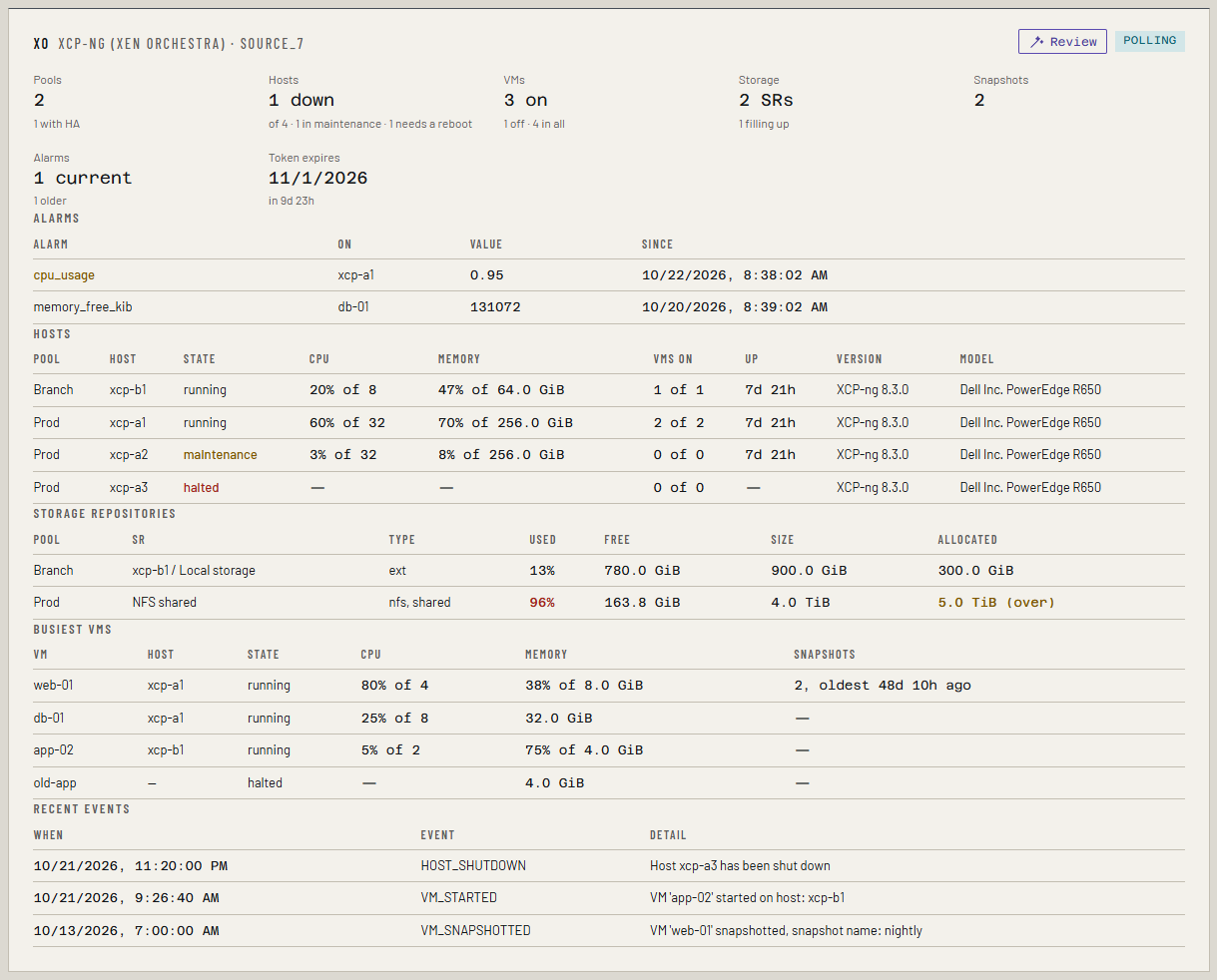
Alarms raised within the hour are yellow; older ones are grey.
It raises:
| Alert | When | Level |
|---|---|---|
Host offline (host_offline) |
A host isn't running | critical |
Storage full (storage_full) |
A storage repository is 90% used, or 95% | warning, then critical |
XCP-ng alarm (xcpng_alarm) |
Xen Orchestra raised an alarm within the last hour | warning |
Xen Orchestra token expiring (xcpng_token) |
The slot's token expires within 14 days, or 2 | warning, then critical |
An alarm in Xen Orchestra is a message, not a state: it stays listed after its cause has cleared, until someone dismisses it. While the cause holds, XCP-ng raises it again. So Collimo lists every alarm, and alerts only on one raised within the last hour. Set the thresholds on hosts and VMs in Xen Orchestra, as usual.
A host in maintenance or waiting for a reboot is shown, not alerted on. "Allocated" is what the disks on a thin storage repository could grow to; more than its size is marked (over).
If something's wrong
| What you see | What to do |
|---|---|
| Xen Orchestra refused the token (401) | The token has expired or was deleted. Make a new one, as above. |
| Connected, but no hosts or VMs | The user has the older "viewer" permission, or none. Give it the copied Read only role, as above. |
| The role can't be given to the user (403) | It's the template. Copy it first (step 3) and give the copy. |
| Load could not be read | The stats requests failed. Everything else still shows; it says why. |
| Nothing answered at that address and port. | Check the address. Xen Orchestra answers on 443, or 80. |
| The certificate isn't trusted. | Untick Verify the certificate. |
See Troubleshooting for more.