Machines without a BMC (Intel AMT)
This page gets Collimo reading machines that have no management controller (BMC) but do have Intel AMT: mini PCs and workstations with Intel vPro, such as the Minisforum MS-01. Without it, Collimo can't see their BIOS version, so cluster consistency can't tell you that one host of a cluster is on an older BIOS.
What Collimo reads: each machine's BIOS version, maker, model and serial number, how many processors and how much memory it has, and the host name AMT holds for it. What it can't: it changes nothing. It never powers a machine on or off, never opens a remote console, and never runs anything on it. AMT reports no health, temperatures or fans, so there are no alerts other than AMT not answering.
Several machines, one slot
One entry can list several machines whose AMT shares the same account. Collimo has eight source slots, so put every machine with the same user and password in one.
Make a read-only account on each machine
AMT must already be set up on each machine (provisioned), with network access on: in its MEBx screen at boot (Ctrl+P on most boards), or with a tool such as MeshCommander.
On each machine, add an account named collimo, with the same password on
every machine in the group, and:
| Setting | Value |
|---|---|
| Access | Network (or both). An account that may only sign in locally is refused over the network. |
| Realms | Hardware Asset and General Info only. Nothing else. |
What the two realms allow
Hardware Asset reads the inventory: BIOS, chassis, baseboard, processors and memory. General Info reads AMT's general settings, where its host name is. Neither can change anything, power the machine, or open a console. Without General Info, Collimo still reads the BIOS, but can't learn the machine's name from AMT, so give Host names (below).
Why sign in with Digest?
AMT only takes HTTP Digest: the password is never sent, only a value worked out from it that's good for one request. Collimo opens no session and leaves nothing open on the machine between polls.
A wrong password slows AMT down
AMT makes an account that keeps failing to sign in wait longer and longer. Collimo reads every 5 minutes, so a wrong password costs a few refusals an hour, but test the account once before you add it.
The Docker host must reach each machine's AMT address on TCP port 16993 (AMT with TLS), or 16992 if TLS is turned off in AMT.
Enter it in the setup wizard
On the wizard's What you have page, set Machines without a BMC (Intel AMT) to the number of groups you have (machines sharing one account count as one). On its page:
- Name: what you call the group, such as
minis. - Addresses: each machine's AMT address with
https://, separated by commas:https://10.0.0.98,https://10.0.0.99. The port is 16993 unless you give another; usehttp://for AMT with TLS turned off. - AMT user and Password: the account you made above.
- Host names: leave it empty if AMT's host name for each machine is
the host's name, as Proxmox VE or vCenter shows it. If it isn't (AMT says
pve-01-oobfor hostpve-01), list the host each address is, in the same order:pve-01,pve-02. - Tick Verify the certificate only if AMT was provisioned with a certificate your network trusts. Most use AMT's own.
- Click Test.
When it works you see ✓ Connected: and how many machines it read.
Editing the stack by hand
The secret is the account's password. Write any $ as $$.
SOURCE_7=amt https://10.0.0.98,https://10.0.0.99 name=minis user=collimo host=pve-01,pve-02
SOURCE_7_SECRET=<password>
host= is optional; when given it names one host for each address. Add
tls=verify to check certificates. The line is read every 5 minutes
unless it says every=. See
Every variable.
Where it shows up
Each machine gets a panel on the Power and servers tab, named by its AMT address: its BIOS, processors, memory and host name. Its BIOS feeds cluster consistency, which compares it with the other hosts of the same maker and model.
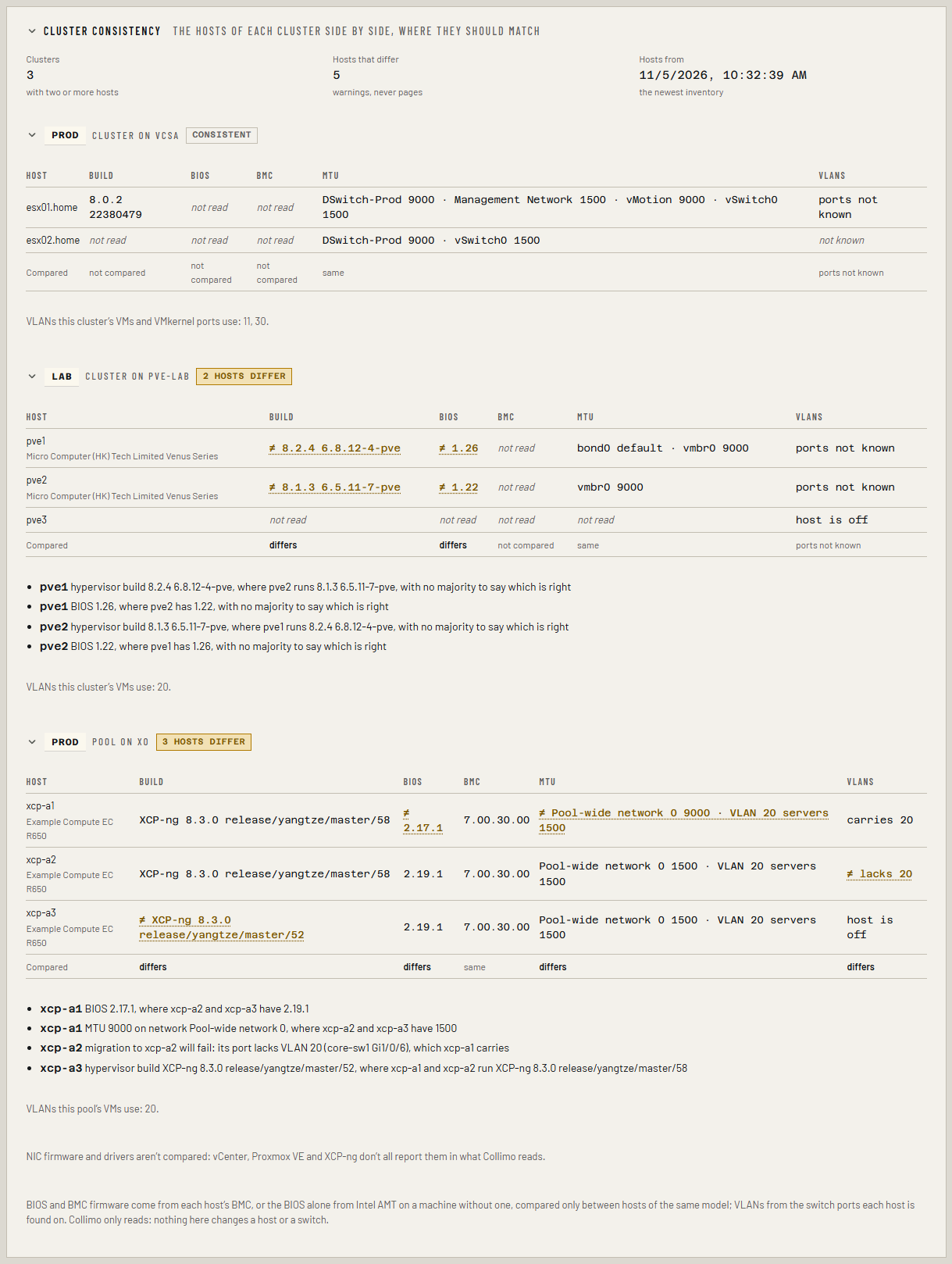
Matching a machine to its host. By serial number first, then by host
name: host= where the line gives it, otherwise the name AMT holds. A serial
that's only a placeholder, such as Default string or To Be Filled By
O.E.M., isn't a serial: every machine of that make says it, so those
machines are matched by name.
Why not the computer name AMT shows?
AMT also keeps the operating system's computer name, but only Intel's service on Windows ever updates it. On a machine that came with Windows and now runs Linux, it is still the old Windows name, so Collimo never reads it.
It alerts when:
| Alert | When | Level |
|---|---|---|
| Source unreachable | A machine's AMT stops answering | critical |
If something's wrong
| What you see | What to do |
|---|---|
| AMT refused the account (401) | Check the user and password, and that the account has network access, not only local. |
| the account can't read ...: give it AMT's ... realm | Add that realm to the account. |
| AMT signed the account in, but it may read none of the inventory | Give the account the Hardware Asset and General Info realms. |
| connection refused, or i/o timeout | Check AMT's address and that network access is on in MEBx; the port is 16993 with TLS, 16992 without. A full power-off (unplugged) restarts AMT; a reboot doesn't. |
| x509: certificate ... | AMT's certificate isn't trusted: untick Verify the certificate, or take tls=verify off the line. |
See Troubleshooting for more.