Alerts and notifications
Ferrule decides what is wrong once, and the same list drives the dashboard, your notifications and the metrics. This page covers where alerts show, how to get them on your phone, and how to keep planned work from paging anyone.
Needs attention
The list above every tab. It shows the 12 worst alerts, critical (red) before warnings (amber). Each line has the tab it lives on (click it to go there), what it is about, and what is wrong. More than 12 ends with and N more — see the alert history on the WAN tab.
Each tab also shows a count of its own alerts, red if any is critical.
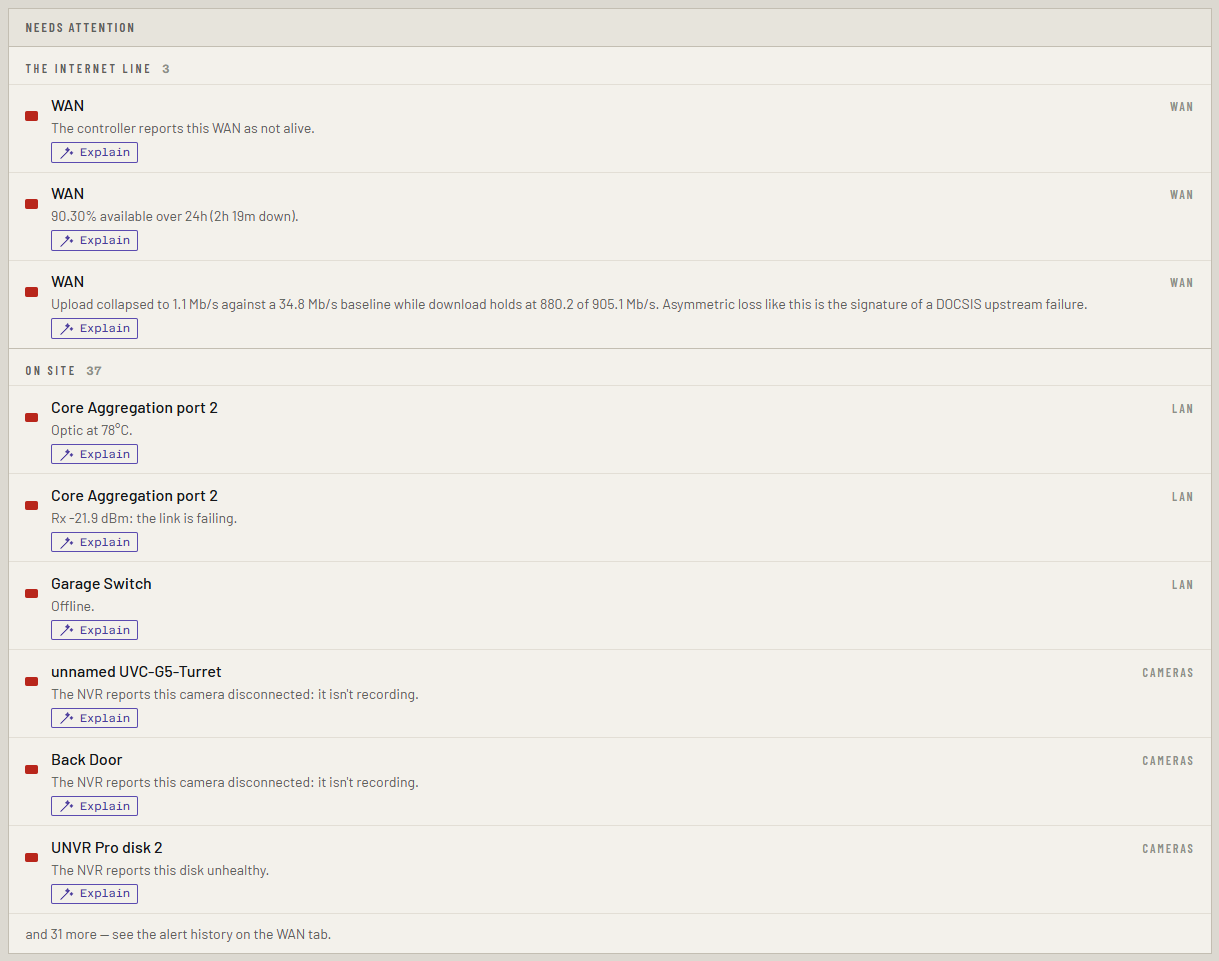
- A behind pill means the device is most likely dark only because something further up its path is offline. The alert still stands.
- Explain asks the assistant, a paid feature.
Where notifications can go
Every channel gets the same notifications, and you can turn on as many as you like. Each one is off until its variables are set in the stack.
| Channel | Edition | Variables |
|---|---|---|
| Gotify | Free | GOTIFY_URL, and GOTIFY_TOKEN or the bundled setup below |
| ntfy | Free | NTFY_URL (the topic's full URL), NTFY_TOKEN if it needs one |
| Pushover | Free | PUSHOVER_TOKEN, PUSHOVER_USER |
| Discord | Free | DISCORD_WEBHOOK_URL |
| Free | SMTP_HOST, SMTP_FROM, SMTP_TO, and SMTP_USERNAME, SMTP_PASSWORD if the server needs them |
|
| Slack, Microsoft Teams, webhook, Apprise | Paid | See Every variable |
| PagerDuty | Paid | PAGERDUTY_ROUTING_KEY. Critical alerts only |
The setup wizard's alerts page writes these for you and sends a test.
Gotify in the stack: set COMPOSE_PROFILES=gotify, GOTIFY_URL=http://gotify,
GOTIFY_ADMIN_PASSWORD and GOTIFY_ALERTS_PASSWORD. Ferrule makes a
ferrule-alerts account in Gotify; sign in to the Gotify phone app as that
user. Gotify is on port 8091 of the Docker host. Add igotify to
COMPOSE_PROFILES for iGotify, which relays to iPhones.
Set DASHBOARD_URL to the address you open Ferrule at, and tapping a
notification opens the alert's tab.
Paid channels send during the trial or with a license. Without one they show paused; the free channels carry on.
Settings → Notifications
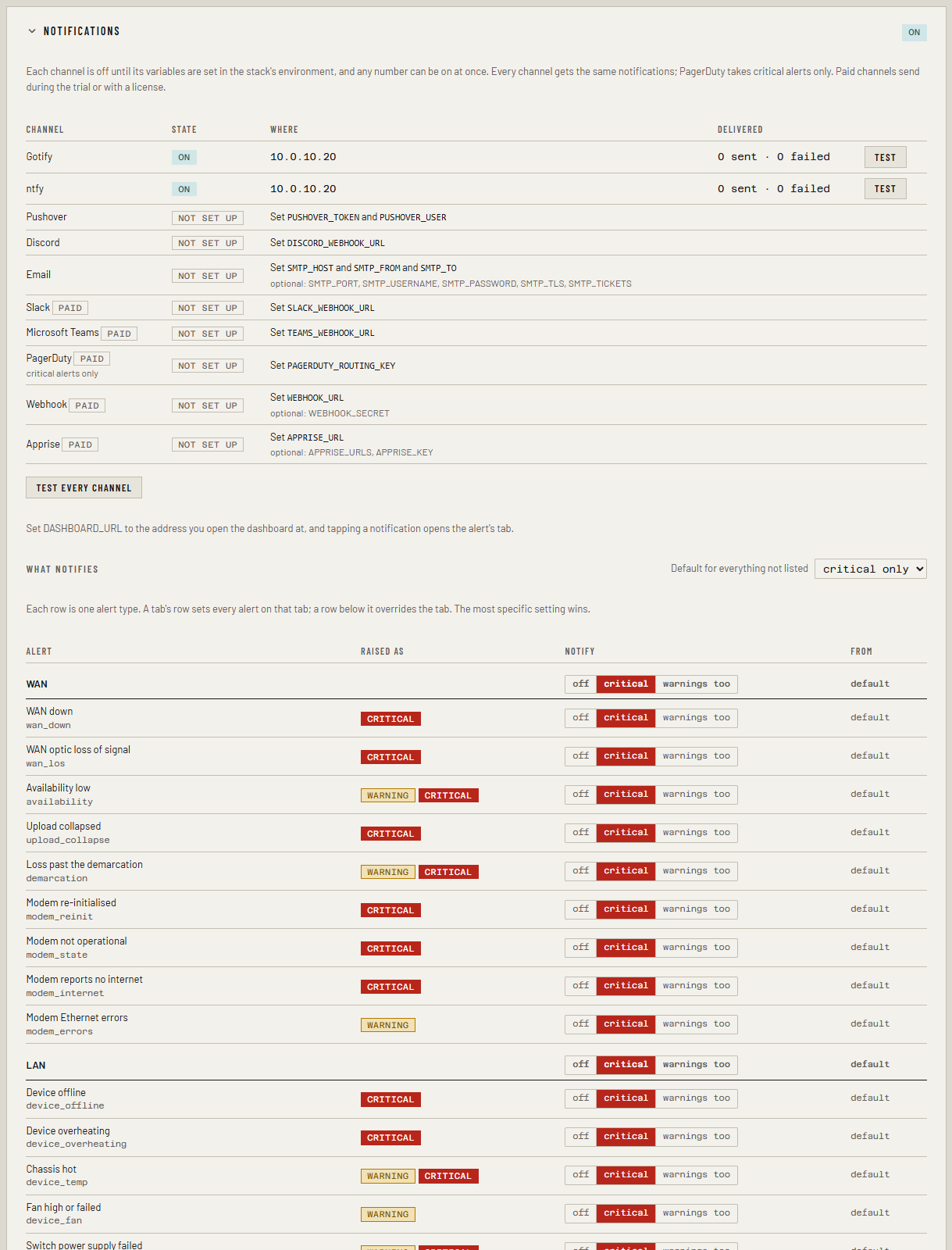
The panel lists every channel with its state (on, not set up, paused or failing), where it sends, and how many were sent or failed.
To check a channel works: click Test on its row, or Test every channel. It says Sent to … Check that it arrived. or why not. Testing needs the operator or admin role when sign-in is on.
Choose what notifies
- Set Default for everything not listed: off, critical only (the default) or warnings too.
- To change a whole tab, pick on its bold row, such as WAN.
- To change one alert type, pick on its row. The most specific choice wins: a type beats its tab, a tab beats the default. From shows where each setting comes from.
- Under When, choose:
- Wait before sending: 2 minutes by default. An alert that clears inside the wait sends nothing at all.
- Repeat critical while active: never, hourly, every 4 hours or daily.
- Quiet hours, such as
22:00-07:00. Only critical alerts are sent then; warnings are held, and those still active arrive as one summary when quiet hours end. - Send a message when an alert clears: on by default.
- The panel writes the lines, such as
NOTIFY_RULES=wan=warn port_slow=off. Click Add to Stack environment or Copy, then apply them:
- Open the
ferrulestack and find Environment variables. - Add or change the lines. In Advanced mode you can paste several at once.
- Click Pull and redeploy.
- Open
.envin the folder where you clonedferrule-deploy. - Add or change the lines.
- Run
docker compose up -din that folder.
Quiet hours need TZ
The container's clock is UTC unless TZ is set, such as
TZ=Europe/London. The panel adds a TZ line with quiet hours.
A rule that names an alert type that doesn't exist stops Ferrule starting, with the bad name in the log, so a typo can't silently switch off nothing.
Alerts already active at start are not sent
When Ferrule starts, or restarts, whatever is already wrong is not news and is not sent. It still shows on the dashboard. Only alerts raised after that notify.
Newer alert types
New in the next release
This is on the dev and qa builds now, and in the next release.
These came with capacity planning and the newer sources. They're in Settings → Notifications like every other type, so rules can name their tab or their key:
| Alert | Key | Tab | Level | Details |
|---|---|---|---|---|
| Capacity runway short | capacity_runway |
Capacity | warning, critical | Capacity planning: alerts |
| Platform license expiring, expired or over-used | platform_license |
Virtualization | warning, critical | vCenter: licenses |
| PDU near its rating | pdu_load |
Power and servers | warning, critical | PDUs |
Alert history
At the foot of the WAN tab. Every alert from every tab is recorded when it is raised and again when it clears: Raised, Cleared (or active), Lasted, Severity, Subject and Detail. Filter by severity, source, or still active only. It follows the outage ledger's date range, and clicking a row finds it on the timeline.
already active at start next to a time means the alert was already true when Ferrule started, so that time is when it was noticed, not when it began.
Planned work: maintenance mode
Before you reboot the gateway, update a switch or restart the Docker host, start a maintenance window. It's free in every edition, and needs the operator or admin role when sign-in is on.
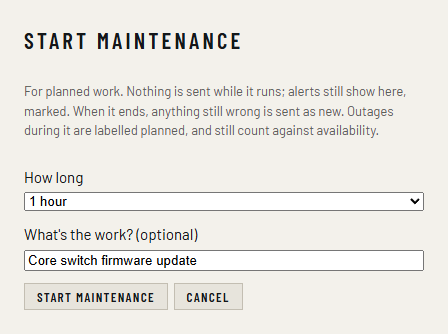
- Click maintenance at the top of the page.
- Choose How long: 30 minutes up to Until I end it (at most 24 hours).
- Optionally, say what the work is.
- Click Start maintenance.
While it runs
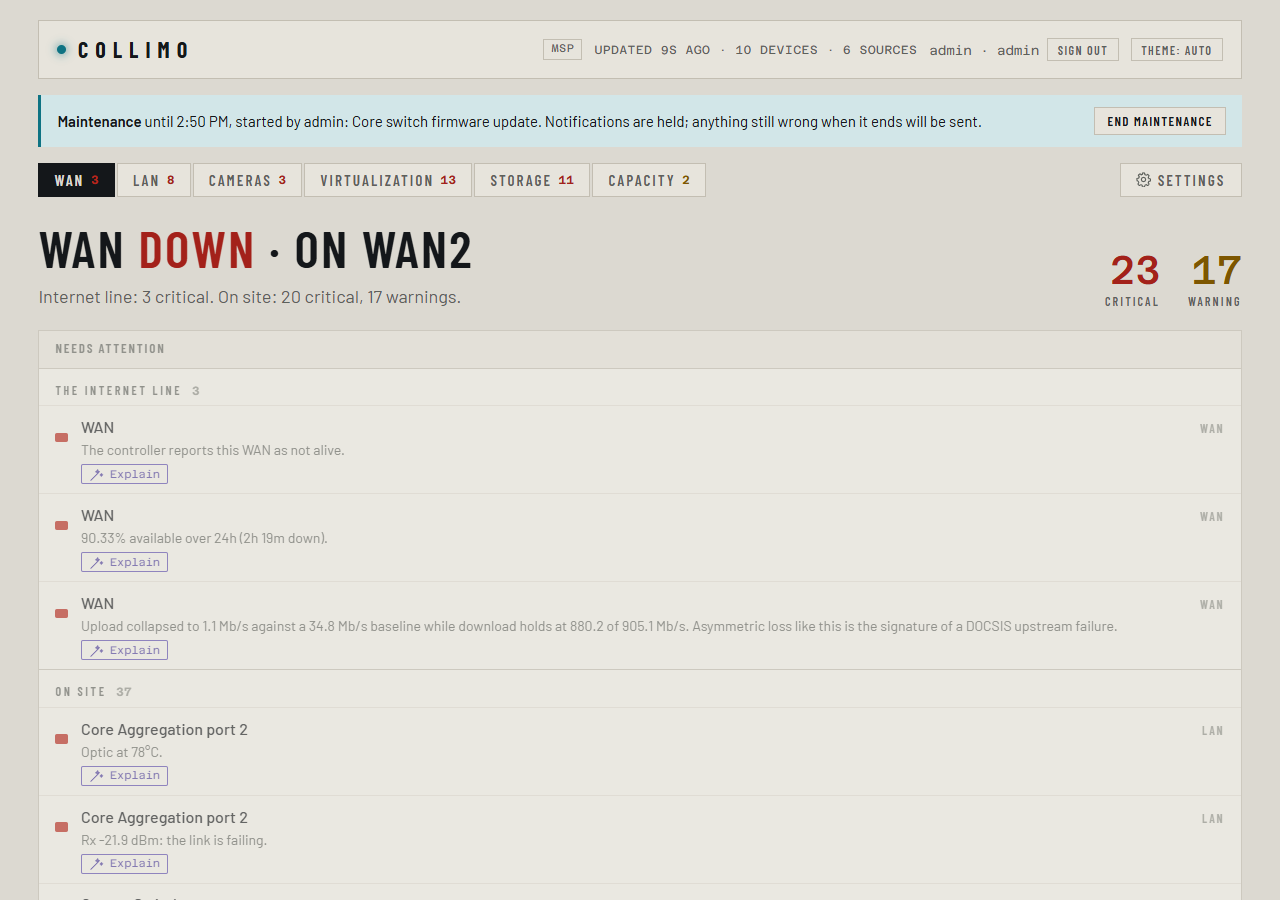
- Nothing is sent. Alerts still show, with Needs attention dimmed under a bar that says until when, who started it and why, so you can watch things come back.
- When it ends, anything still wrong is sent after the usual wait, as if it had just happened. Anything that came and went during the work sends nothing. End maintenance stops it early.
- Outages during it are labelled planned in the outage table and the CSV. They still count in availability, so the figures stay honest; the label lets you leave them out of a complaint to your ISP.
- Starting and ending it are in the audit log, and the metric
infra_maintenance_activeis 1 while it runs, for your own alerting.
If something's wrong
| What you see | Why, and the fix |
|---|---|
| A channel shows failing | The reason is under Delivered. Fix the variable and redeploy |
| A paid channel shows paused | No license, and the trial has ended |
| Nothing arrives for an alert you can see | It was active when Ferrule started, cleared inside the wait, or its tab or type is set to off |
| Warnings arrive in the morning | Quiet hours held them. Check TZ |
More in Troubleshooting.