Proxmox VE and Ceph
This page gets Ferrule reading your Proxmox VE cluster with a read-only API token.
What Ferrule reads: every node's state, CPU, memory, uptime and version; quorum; every storage's use; every guest's state, with CPU and memory for the busiest fifteen; and Ceph, if the cluster runs it. What it can't: it changes nothing, and it reads no guest's contents or console.
One source covers the whole cluster. Any node's address will do.
Make the read-only token
In the Proxmox web interface, go to Datacenter → Permissions:
- Users → Add: user name
telemetry, realm Proxmox VE authentication server. Give it a long random password; Ferrule never uses it. - API Tokens → Add: user
telemetry@pve, token IDro, with Privilege Separation ticked. Copy the secret now: it's shown once. - Permissions → Add → User Permission: path
/, usertelemetry@pve, role PVEAuditor, Propagate ticked. - Permissions → Add → API Token Permission: path
/, tokentelemetry@pve!ro, role PVEAuditor, Propagate ticked.
Do both step 3 and step 4
With privilege separation on, the token sees only what both it and its user may see. Miss either and Proxmox shows Ferrule an empty cluster, with no error.
PVEAuditor is read-only, and it covers Ceph too.
Enter it in the setup wizard
On the wizard's What you have page, set Proxmox VE to 1 (one per
cluster). On its page:
- Name: what you call it, such as
pve-lab. - Address: any node, with the port:
https://192.168.1.10:8006. - API token ID:
telemetry@pve!ro. - API token secret: the secret from step 2.
- Leave Verify the certificate off, unless Proxmox has a trusted certificate.
- Click Test.
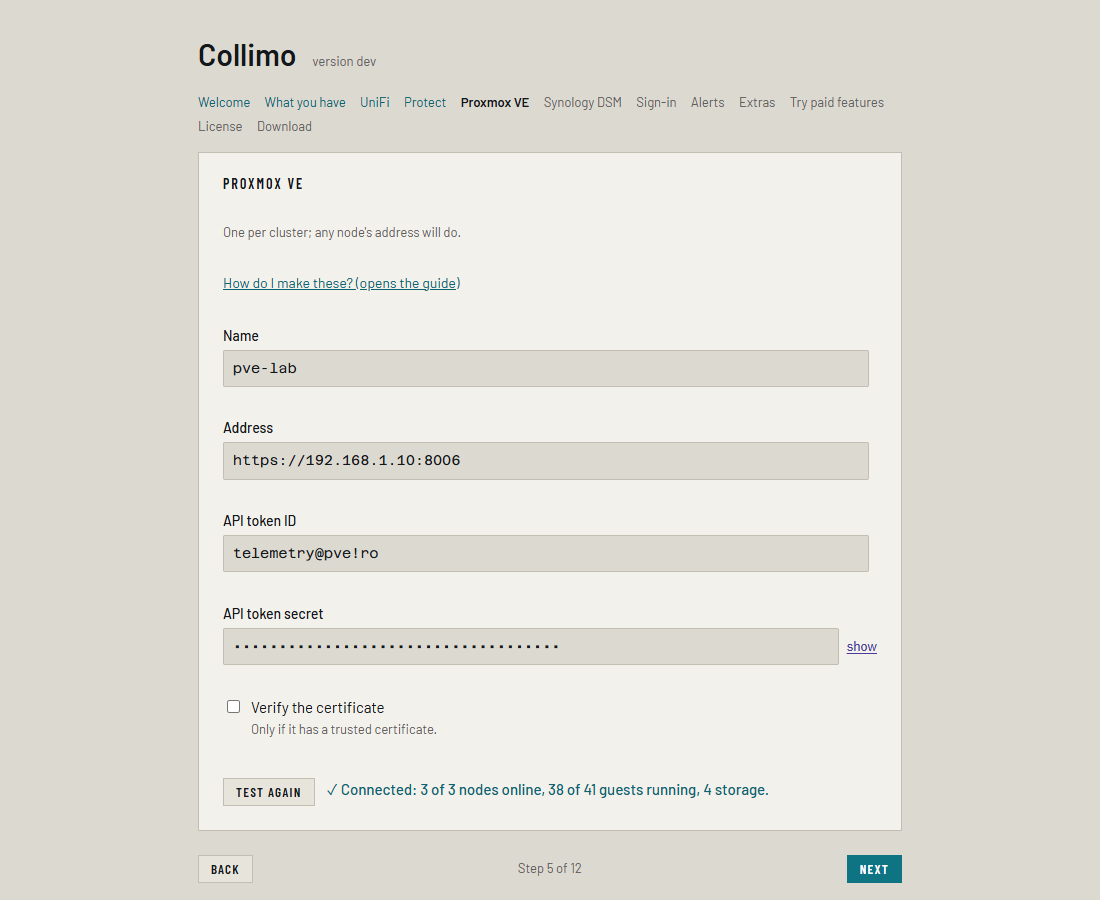
When it works you see ✓ Connected: and what it found, such as
3 of 3 nodes online, 38 of 41 guests running, 4 storage, Ceph OK. Anything
already wrong, such as a nearly full storage, is listed underneath.
Editing the stack by hand
Each source takes a numbered slot, SOURCE_1 to SOURCE_8, with its
secret beside it. Write any $ in the secret as $$.
SOURCE_1=proxmox https://192.168.1.10:8006 name=pve-lab user=telemetry@pve!ro
SOURCE_1_SECRET=<the token secret>
Settings → Add a source writes the first line for you. See Every variable.
Where it shows up
The cluster gets a panel on the Virtualization tab, with Ceph's health on it when you run Ceph. Settings → Sources lists it as polling; for the first minute it says waiting for first poll.
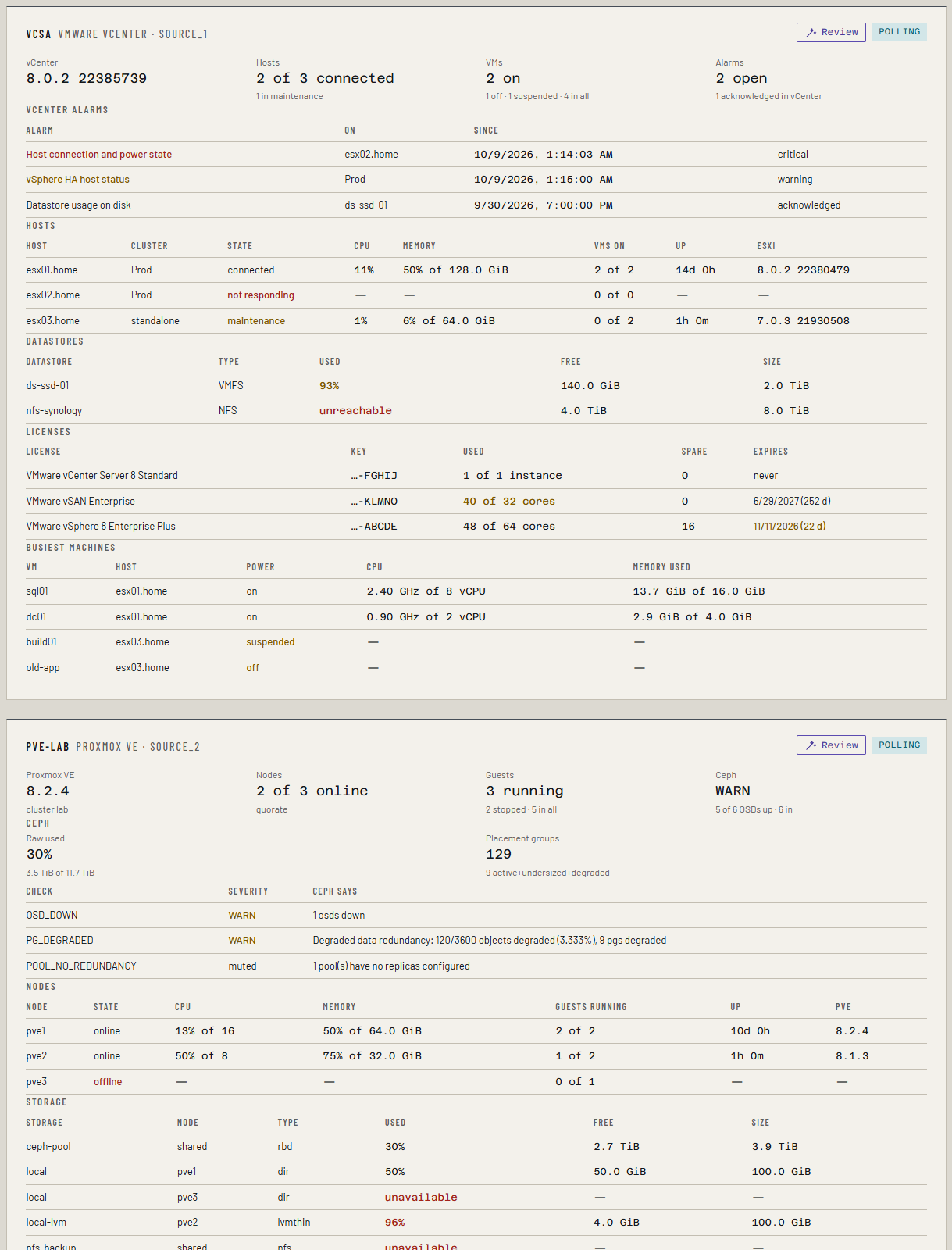
It alerts on a node that has left the cluster, lost quorum, storage that is unavailable or nearly full (90% is a warning, 95% is critical), and every health check Ceph raises. A check you mute in Ceph stays quiet in Ferrule.
What else it reads, for the Business features
New in the next release
This is on the dev and qa builds now, and in the next release.
The same PVEAuditor token reads more than the dashboard shows. None of it needs another permission.
| What | Where in the API | When | What it's for |
|---|---|---|---|
| Backup jobs and their retention | /cluster/backup, and /storage for each PBS storage |
Every poll | A PBS datastore with no keep policy of its own takes the policy of the Proxmox VE job that backs up to it. See Proxmox Backup Server. |
| Each storage's content | /nodes/<node>/storage/<storage>/content |
With each inventory | Orphaned disks: volumes no guest's config uses. See Reclaim and orphaned disks. |
| Each node's network interfaces | /nodes/<node>/network |
With each inventory | The Host NICs sheet of the inventory, and the node's own addresses for adding a host. |
Backup job retention. For each PBS storage defined in Proxmox VE, the
policy is the first enabled backup job's Retention (its
prune-backups) that writes to that storage. A job with none falls back
to the storage's own retention. Keep all backups is no policy, and a
disabled job doesn't count.
Orphaned disks. Only storages that hold disk images or container disks are listed. A shared storage is listed once, through the first node that's up; a local one through its own node. A volume is an orphan when:
| Kind | When |
|---|---|
| No VM uses it | Its VM ID belongs to no guest in the cluster |
| Not in its config | Its guest exists, but no line of the guest's config names it |
| Detached | The guest's config keeps it as unusedN: detached, but not deleted |
A guest whose config couldn't be read (its node is down) has nothing said
about its volumes. A snapshot's saved memory (vm-100-state-…) isn't an
orphan. Ferrule deletes nothing.
Node interfaces. Physical ports, bonds (with their members and mode) and bridges (with their ports), and every address the node has, VLAN interfaces included. Proxmox VE's API doesn't say a port's MAC address or link speed: the switch it's plugged into says those.
If something's wrong
| What you see | What to do |
|---|---|
Connected, but 0 of 0 nodes online, and the panel says Proxmox VE shows this token no nodes |
Step 3 or step 4 is missing. Add it. |
| Proxmox VE refused the credentials | The token ID or secret is wrong. The ID is user@realm!token. |
| Proxmox VE denied the account access (403); check its role | Check the PVEAuditor permissions on /. |
| set user= on the slot to the API token ID | The token ID is missing, or has no !. Use telemetry@pve!ro, not telemetry@pve. |
| Nothing answered at that address and port. | Add the port, :8006. |
| The certificate isn't trusted. | Untick Verify the certificate. |
| Ferrule couldn't reach Proxmox VE from the Docker host: no answer. | A firewall is blocking the Docker host from port 8006. |
| A PBS datastore's row shows no policy, though the backup job has one | The token can't read backup jobs or storage: check PVEAuditor on /, for both the user and the token. |
| The inventory's Health sheet says a storage couldn't be listed for orphaned disks | That node was down, or the storage is unreachable. The rest of the inventory is unaffected. |
A source that fails after it starts shows unreachable on its panel and on Settings → Sources, with the reason. See Troubleshooting.