WAN, outages and your ISP
The WAN tab answers three questions: is the internet working, which link is carrying it, and whose fault it was when it wasn't. It also keeps a record of every outage that you can hand to your ISP.
You need a UniFi gateway connected as in UniFi Network. The cable modem tile appears only with a UniFi cable modem in the same Network console.
The WAN panel
Each internet link (WAN, WAN2) gets a card. The badge says what it is
doing:
| Badge | Means |
|---|---|
| carrying traffic | This link is in use now. Only one link has this badge |
| standby | Working, waiting for a failover |
| down | The controller reports it offline or not alive. The card turns red |
Ferrule marks the first working link, in order, as carrying traffic, which is how UniFi failover picks one. If no link works, the panel says No WAN is currently carrying traffic.
Each card shows availability and latency as the gateway reports them, link speed, the WAN address, the next hop (your ISP's first router), your ISP's name and network number, and the gateway's own monitor targets.
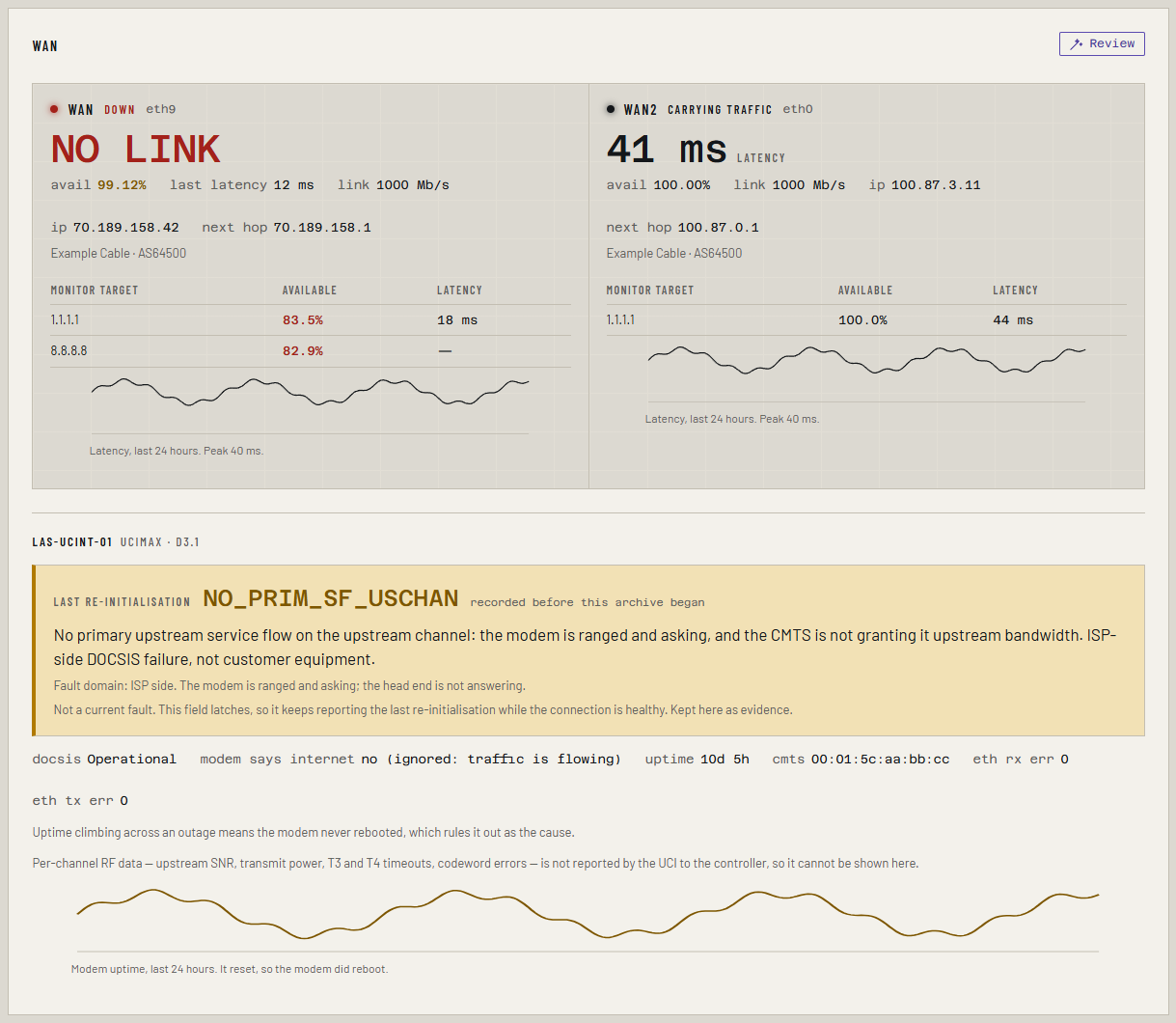
The cable modem and its re-initialisation reason
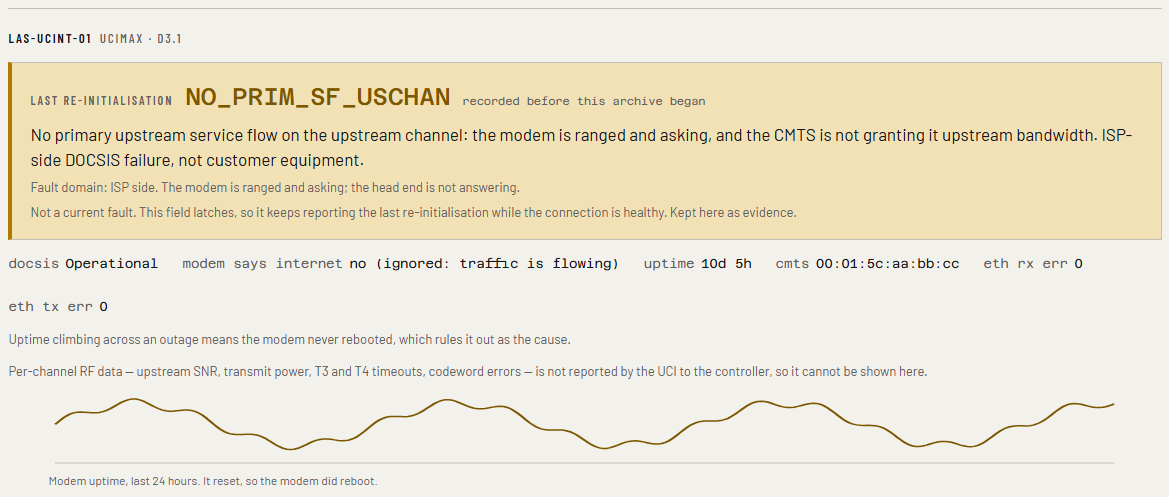
When a cable modem drops off the cable network and comes back, it records why. That reason is the most useful single piece of evidence in an argument with a cable ISP, so it gets the big banner, translated into plain words:
| Fault domain shown | Typical reasons | Means |
|---|---|---|
| ISP side | NO_PRIM_SF_USCHAN, REGISTRATION_FAILED, DHCP_FAILED |
The modem was asking and the ISP's head end did not answer |
| Outside plant | T3_NO_RNG_RSP, T4_NO_STATION_MAINT, T1_EXPIRED, SYNC_TIMING |
Signal, noise or timing on the coax: a job for an ISP technician |
| none | NONE, POWER_ON |
Nothing abnormal. POWER_ON means the modem was power-cycled |
The modem keeps reporting its last reason for as long as it stays up, even days later. So the banner's colour depends on when it changed:
- Amber, "Not a current fault": traffic is flowing and the reason changed more than an hour ago. It stays on screen as evidence.
- Red: it changed in the last hour, or no link is carrying traffic. This raises the Modem re-initialised alert.
Next to the reason is when it changed. recorded before this archive began means the modem already had that reason when Ferrule started watching.
Below the banner: the DOCSIS state (anything other than Operational is an
alert), uptime, and Ethernet errors on the modem's own port, which are on
your side of the connection. With history on, a 24-hour uptime graph shows
whether the modem rebooted: a line climbing straight through an outage means
it did not, which rules your modem out.
Why \"modem says internet: no\" is ignored
The modem's own "internet" flag can sit at no for days on a healthy connection. Ferrule shows it, but while a link is carrying traffic it reads no (ignored: traffic is flowing) and raises no alert. It only counts when nothing else is working either.
The demarcation probe
The probe pings three points every minute and shows loss and round-trip times for each: your own gateway, the ISP's first router, and something on the internet. If your gateway answers cleanly and the ISP's router drops packets, the fault is on the ISP's side of the line, and the panel says so.
It is off until you set PROBE_TARGETS. Use the next hop from your WAN
card for wan_next_hop:
PROBE_TARGETS=lan_gateway=192.168.1.1,wan_next_hop=203.0.113.1,internet_control=1.1.1.1
- Open the
ferrulestack and find Environment variables. - Add or change the lines. In Advanced mode you can paste several at once.
- Click Pull and redeploy.
- Open
.envin the folder where you clonedferrule-deploy. - Add or change the lines.
- Run
docker compose up -din that folder.
Never use 192.168.100.1
It is a cable modem's address on some networks and a Starlink dish's on others, so you can't tell what you would be measuring.
A Demarcation probe table appears under the modem within a minute. If it
doesn't, the ferrule container's log has a line starting probe: saying
why.
Speed tests
Ferrule doesn't run speed tests. It reads the results of the ones your gateway runs on its schedule, and keeps them, so set up scheduled speed tests in UniFi Network if you want them. Each one is a pair of bars on its WAN's lane in the timeline below.
Upload collapsed is a critical alert for one specific pattern: the latest test's upload is under a quarter of the usual (the median of the tests before it) while download is still at least half of usual. On cable, that lopsided drop is the signature of an upstream fault. It needs at least three earlier tests to compare against.
Availability, and what "Archive covers" means
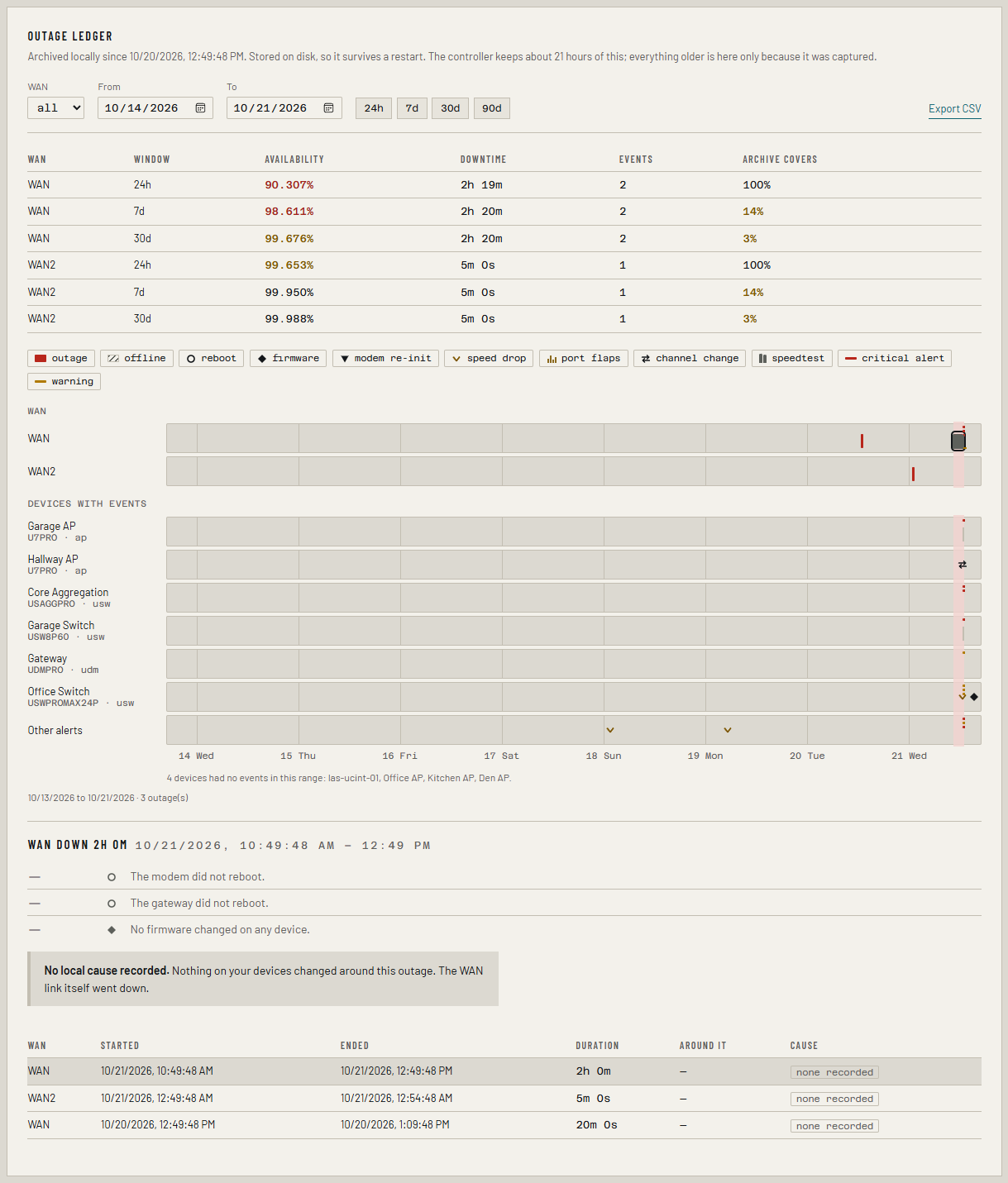
The Outage ledger starts with a table: availability for each WAN over 24 hours, 7 days and 30 days, with total downtime and the number of outages.
The last column, Archive covers, is how much of that window Ferrule was actually watching. A fresh install has watched for a day, so its 30-day row covers about 3%. That is correct, not a fault: a 30-day figure from one day of records is not a 30-day figure, and Ferrule won't pretend it is. The column reaches 100% once Ferrule has run for the whole window.
Availability under 99% over 24 hours raises a warning; under 95% is critical.
The outage ledger and timeline
Pick a WAN, a date range or a preset (24h, 7d, 30d, 90d).
- The timeline has a lane per WAN and one per device that did something: outages in red, and markers for reboots, firmware changes, modem re-initialisations, speed drops, port flaps, Wi-Fi channel changes and alerts. Click the chips above it to hide a type.
- Click an outage, in the timeline or the table, to see what happened within 15 minutes of its start or end, what did not happen (no reboot, no firmware change), the nearest speed tests, and its cause.
| Cause | Means |
|---|---|
| planned | It overlapped a maintenance window |
| local | The gateway or modem rebooted, updated or went offline around it, or the modem was power-cycled |
| ISP | The modem blamed the ISP's head end and nothing on your side changed |
| cable plant | The modem lost ranging or timing on the coax and nothing on your side changed |
| none recorded | Nothing on your devices changed: the link itself went down |
Every outage counts against availability, whatever its cause. The cause is a label, so you can decide what to leave out of a complaint.
Export the CSV for your ISP
- Choose the WAN and the date range.
- Click Export CSV.
You get one row per outage, oldest first, with start and end in UTC (ISO
8601 and Unix time), the duration, the cause, and around: what happened
near it. Filter out local and planned rows before you send it.
If something's wrong
| What you see | Why, and the fix |
|---|---|
| No WAN tab | UNIFI_ENABLED=false or WAN_ENABLED=false is set in the stack |
| No cable modem tile | There is no UniFi cable modem in this Network console |
| No outages, but you had one | The controller only keeps about 21 hours. An outage older than that when Ferrule first ran, or while it was stopped, is gone |
| NOT persisted under Outage ledger | The archive can't write to its volume, so outages are lost on restart. See Troubleshooting |
More in Troubleshooting.