Tools
The Tools tab runs the checks you'd reach for by hand when something's wrong: ping, traceroute, a DNS lookup, a mail domain check, a TLS certificate check, an HTTP request, a TCP port check and a port scan. They run on Collimo, from where it sits, so they test the same path it watches. Tools are free on every edition.
They only look. No tool changes anything on your network.
Before you start
- Sign-in must be on. Tools stay shut while it's off, because anyone who could reach the page could use them to look around your network. Set up a local admin under Settings → Access, then sign in.
- You need the admin role. Operators and viewers don't see the tab.
- IPv4 only, for now. An IPv6 address says it isn't supported yet.
Run a tool
- Open Tools.
- Pick the tool: Ping, Traceroute, DNS, Mail, TLS certificate, HTTP, TCP port or Port scan.
- Type the target, and click Run.
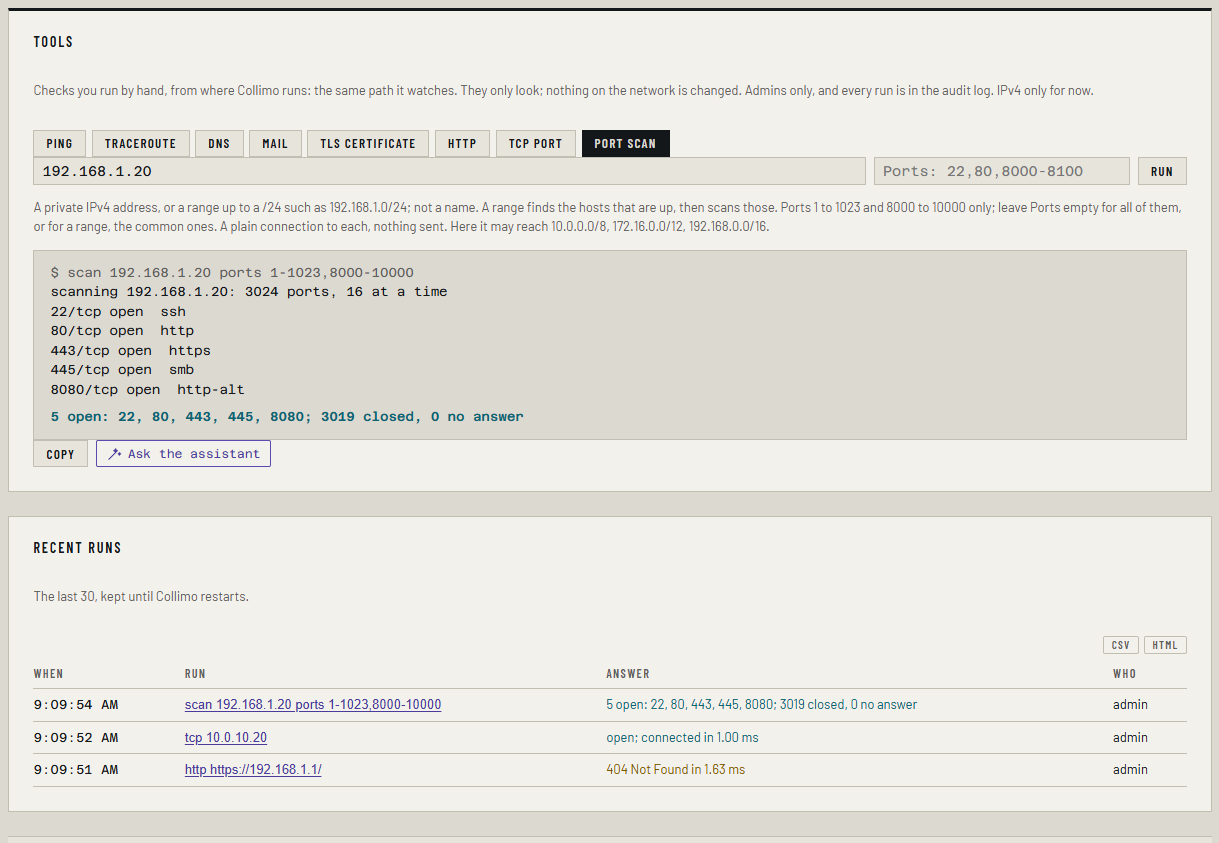
The screen fills as the tool runs, and its last line is the answer: aqua when it's good news, amber when it isn't. Copy puts the whole run on the clipboard, ready for a ticket.
| Tool | Target | What you get |
|---|---|---|
| Ping | A host name or IPv4 address | Each reply's time, then loss, minimum, average, maximum and jitter. 4 or 10 echoes |
| Traceroute | A host name or IPv4 address | Each router on the way and its time, up to 30 hops, with its name where it has one. * is a hop that didn't answer |
| DNS | A name, or an address for its PTR | The records, from this host's resolver or a server you name. A, AAAA, CNAME, MX, NS, TXT and PTR |
A mail domain, such as example.com |
Its MX, SPF (with its DNS lookups counted against the limit of 10) and DMARC, then each mail server on port 25: does it greet, offer STARTTLS, and is its certificate trusted. Nothing is sent | |
| TLS certificate | host, or host:port (443 when no port is given) |
The protocol, who the certificate is for and who signed it, its dates, and whether this host trusts it |
| HTTP | An address (https:// when none is given) |
Each redirect, the status, the time to connect and to the first byte, and a few headers |
| TCP port | host:port |
Whether it's open, how long the connection took, and whatever the service says first, such as an SSH banner |
| Port scan | A private IPv4 address, such as 192.168.1.20, or a range up to a /24, such as 192.168.1.0/24; and optionally Ports, such as 22,80,8000-8100 |
For one host, each open port, and how many were closed or didn't answer. For a range, each host that's up, named where Collimo knows it, with its open ports. Ports 1 to 1023 and 8000 to 10000 only; empty means all of them for one host, and the common ones for a range |
The port scan stays inside
The port scan only reaches private addresses: 10.x.x.x, 172.16.x.x to
172.31.x.x, and 192.168.x.x. Type the address, not a name. It checks
the well-known ports (1 to 1023) and 8000 to 10000, where web consoles
such as 8080 and 9443 sit. It opens a plain connection to each port and
sends nothing.
Scan a range
Type a range as a network, such as 192.168.1.0/24. A /24 (256
addresses) is the widest. The scan runs in two steps:
- Find the hosts that are up. Each address gets a ping and a try on ports 22, 80 and 443. An address that doesn't answer any of them is skipped.
- Scan each host that's up. With Ports empty, it checks about 35 common ports, such as SSH, web, SMB, printers and Proxmox. Type ports to check those instead.
Each host is named from what Collimo knows: the devices it watches and the controller's client list. A host that answers but isn't in the client list is marked not in the client list. That's worth a look: it could be the forgotten Raspberry Pi in the closet. Collimo reads the client list only when it watches sources or up-checks; without a recent one, no host is marked.
A range scan stops after 5 minutes. A /24 on the common ports usually takes a minute or two.
To keep it to some of your networks, set TOOLS_SCAN_NETWORKS, such as
192.168.1.0/24, 10.20.0.0/16. It can only narrow the scan: a network
outside the private ranges is left out.
Why no wider than a /24, and why might my firewall notice?
Scanning a whole network is what an intrusion prevention system looks for, and one that blocks Collimo's address stops it watching your network. So a range is found first and only the hosts that are up are scanned, a few connections at a time, and never more than 256 addresses. A scan that crosses VLANs still passes your gateway's IPS. If it flags the scan, allow Collimo's address there, or scan one host.
Why run them from Collimo, not your laptop?
Your laptop may be on another VLAN, behind a VPN, or using a different DNS server. Collimo is on the network it watches, so its answer is the one that explains its alerts. A port that's open from your desk can be closed from there.
Ask the assistant
Where the assistant is on, a finished run has Ask the assistant. It sends the run to the model you pick, with its host name and addresses withheld as usual: see The assistant. The assistant is a paid feature; the tools are not.
Recent runs
Recent runs lists the last 30, newest first: when, what was run, the answer and who ran it. Click a run to see it again. Runs are kept in memory and go when Collimo restarts. Every run is in Settings → Audit log too.
Limits
- One run at a time for each admin, and 30 in 10 minutes.
- Each run stops after 20 seconds, or a little longer for 10 pings, 45 seconds for a mail check and 90 for a traceroute.
192.168.100.1is never checked. It's a cable modem's address on some networks and a Starlink dish on others, so what it reaches depends on the network. Collimo reads the modem from your console instead.
Troubleshooting
| What you see | What it means |
|---|---|
| "Tools need sign-in…" | Sign-in is off. Set up a local admin under Settings → Access |
| "Tools are for admins" | You're signed in as an operator or viewer |
| "… is outside the private ranges" | The port scan only reaches 10.x, 172.16–31.x and 192.168.x addresses |
| "… is outside the networks a scan may reach here" | TOOLS_SCAN_NETWORKS narrows the scan, and this address isn't in it |
| "… is wider than a /24" | A range scan covers 256 addresses at most. Scan the /24s one at a time |
| A port scan ends "no answer on the first 64 ports" | Nothing answered, not even to refuse: the host is off, or a firewall drops these |
| "ping isn't available here" | The container can't open its ICMP socket. Check net.ipv4.ping_group_range is still set in the stack, as it is in docker-compose.yml |
| "traceroute isn't available here" | As for ping: the ICMP socket can't be opened |
A traceroute shows * for a hop, then carries on |
That router doesn't answer these. It isn't loss: only * from some hop to the end means something stops there |
| A traceroute ends "no answer past hop …" | Five hops in a row said nothing. Often a firewall that drops ICMP |
| Mail: port 25 timed out at every server | Many ISPs block outbound port 25, so it may be the line where Collimo runs, not the servers |
| Mail: "the certificate isn't trusted" is a warning | Most mail servers deliver over STARTTLS whatever the certificate, so it's worth fixing, not an outage |
| "no TLS on …: it answered, but not with TLS" | The port speaks plain text, often plain HTTP. Try the HTTP tool with http:// |
| "a tool of yours is still running" | Wait for the last run to finish |
| DNS says "no … record" | The name exists but has no record of that type, or doesn't exist. Both are answers, not failures |