Resilience: what fails with each switch, UPS and host
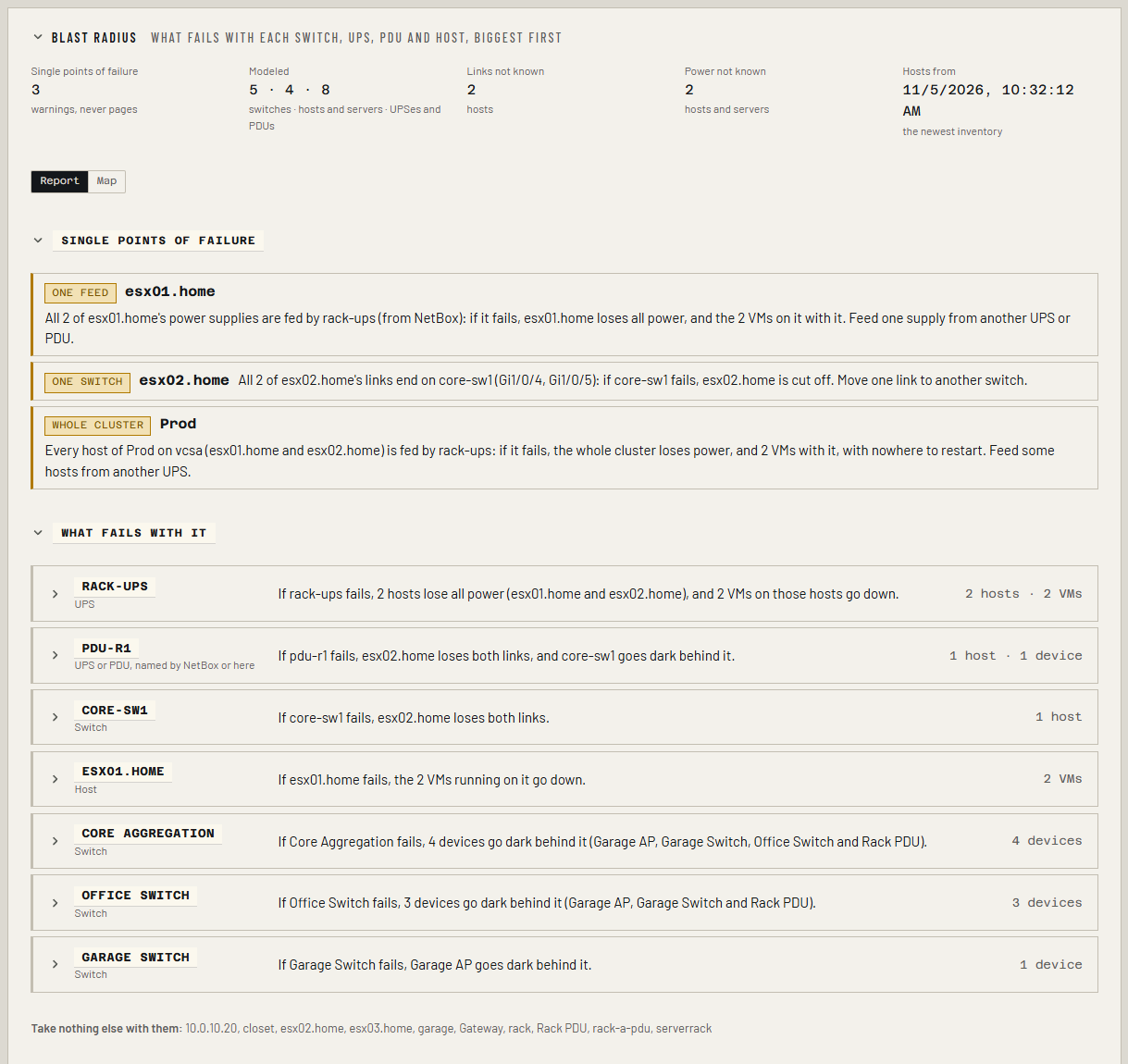
The Resilience tab answers one question for every switch, UPS, PDU and host: if this one dies, what goes down with it?
If core-sw1 fails, esx02.home loses both links, and 12 VMs on it go down.
It also warns about the three single points of failure that look redundant until the day they aren't:
- a host whose two (or more) network links all plug into one switch;
- a server whose two (or more) power supplies are all fed by one UPS or PDU;
- a cluster whose every host is fed by one UPS or PDU.
They're warnings, never critical: nothing is broken today.
Resilience is part of Business and MSP. Collimo only reads: it never changes a cable, a port or a setting.
Before you start
The tab appears once Collimo knows at least one switch, and at least one host or UPS. It works best with:
- Your switches: UniFi (with the console) and any others over SNMP (see Switches over SNMP).
- Your hypervisors: vCenter, Proxmox VE or XCP-ng, and an inventory. Each host's network cards come from the newest inventory, which runs daily by itself on Business. To get one now, open the Virtualization tab and choose Take inventory now.
- Your servers' management controllers (Redfish), so Collimo knows how many power supplies each has (see Servers).
- Your power cables, in NetBox, or set by hand (below).
Why the inventory, and not the live poll
vCenter only lists a host's physical network cards, and their MAC addresses, in the wider read the inventory makes. Reusing the newest inventory costs nothing extra. A host added since then shows up after the next one.
Read the tab
The tab opens on the Report. Choose Map to see the same picture drawn: see Topology map.
- Single points of failure: the warnings, one line each, with what to change. A line is amber until you mark it seen in Needs attention.
- What fails with it: one row per switch, UPS, PDU or host that takes anything with it, the biggest first. The closed row is the sentence; open it for the hosts that go down, why (links or power), and the VMs on each.
- Take nothing else with them: everything that fails alone. That's the good news.
- Not known: hosts whose links or power Collimo couldn't map, why, and how to fix each.
VMs are counted where they run now
If a host goes down, its VMs are counted as going down. Whether HA restarts them on another host isn't modeled, because that depends on spare capacity and HA settings at the moment it happens.
How Collimo finds where a host plugs in
Each host's network cards, from the inventory, are looked up on the switches' MAC tables and in the UniFi console's client list. A card's own address on a switch port, or the addresses of the VMs running on the host, place that link. LLDP on the host works too.
A host is only judged when every card it has up is found. If one isn't, the host is listed under Not known as links, partly, and it never warns: a link Collimo can't see might well be on another switch.
To fix a host that isn't placed:
- Add the switch it plugs into, if Collimo doesn't read it yet.
- Or turn on LLDP on the host (on ESXi, set the virtual switch's
discovery protocol to LLDP, Both; on Proxmox VE,
apt install
   lldpd
on each node). The next poll places it.
Power: from NetBox, or set by hand
Nothing on a UPS or a server says which outlet a supply is plugged into, so Collimo needs to be told. It never guesses from names or racks.
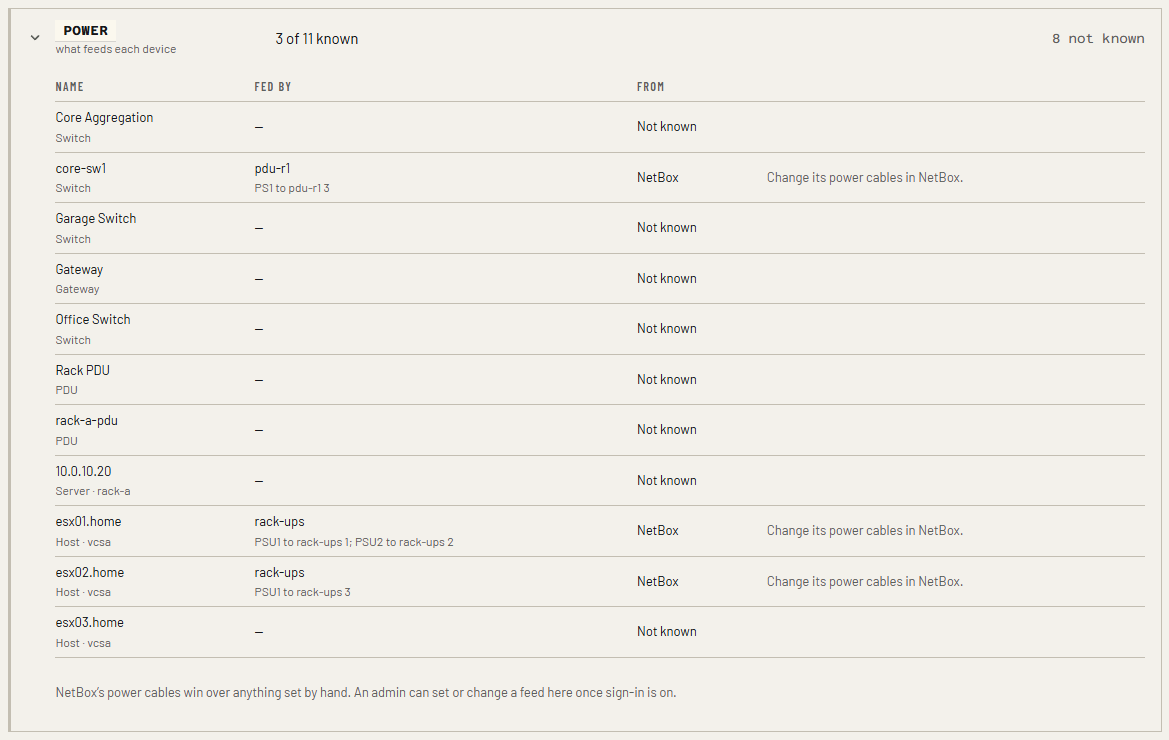
From NetBox (recommended): cable each device's power ports to the UPS or PDU outlets they're plugged into. Collimo reads the cables with the NetBox token you already gave it; see IPAM and DCIM. It matches each NetBox device to what it reads by serial number, then by name.
By hand, when NetBox doesn't have it:
- Sign in as an admin.
- Open the Resilience tab and open Power. It lists every switch, gateway, PDU, host and server, what feeds it, and where Collimo learned that: NetBox, Set here or Not known.
- On the device's row, type the UPS or PDU that feeds it in Fed by. If its two supplies are on two different ones, fill in both.
- Choose Set fed by. It counts from the next poll.
To change a feed set here, choose Change on its row; to undo it, Forget. Every change is in the audit log as power_fed_by.
A row from NetBox is changed in NetBox: recable it there. If a feed was also set here before NetBox had cables for that device, the row says so and offers Forget, since NetBox's cables win while they exist.
A switch on a UPS
Set a switch's feed and it fails with that UPS in the blast radius, taking with it the hosts whose links all go through it.
One name means all its supplies
Setting one UPS says every supply of that server is on it. If the server has two supplies (its management controller says how many), that's a single point of failure and it warns.
The warnings
| Alert | Key | Means |
|---|---|---|
| Host's links all end on one switch | spof_links |
Two or more links, all known, all on the same switch |
| Server's power supplies all fed by one UPS or PDU | spof_power |
Two or more supplies, all known, all fed through the same UPS or PDU |
| Every host of a cluster fed by one UPS or PDU | spof_cluster_power |
Two or more hosts in the cluster, every one's power known, all through the same UPS or PDU |
All three are on the Resilience tab, are warnings only, and can be turned off or routed like any other alert in Settings → Notifications.
Already true when Collimo started
A single point of failure found in the first ten minutes after Collimo starts is marked as already there, and doesn't notify. One found later, for example after a new inventory, notifies as a new warning.
Why a gateway takes almost nothing with it here
When the gateway fails, the internet and routing between networks go, which the WAN tab covers. On this tab, the switches plugged into the gateway keep the rest of the network together, so its row lists only what's plugged into the gateway itself.
Metric and API
infra_spof_affected_hosts{point, kind}: how many hosts go down with each switch, gateway, UPS and PDU.GET /api/resilience/graph: the whole dependency graph, as nodes and edges, each edge saying what reported it.GET /api/resilience/map: the same graph for the topology map, with each node's alerts.
Questions
A host I know is on two switches is under Not known. One of its cards isn't seen on any switch Collimo reads. Add that switch, or turn on LLDP.
The tab doesn't appear. It needs Pro, Business or MSP, a switch, and a host or a UPS. Without an inventory there are no hosts yet: take one (Take inventory now) from the Virtualization tab.
NetBox has the cables, but power still says not known. The NetBox device's serial number or name has to match what Collimo reads: the host name in vCenter, Proxmox VE or XCP-ng, or the server's serial. Check that every power port of the device is cabled; one left uncabled makes it partly known.